
Svennis AI
10 min read

A website AI assistant that takes visitors from FAQ to booked meeting

A practical guide to a website AI assistant on Claude: what it answers from, what it must never promise, when it hands over, and how the lead reaches Zoho CRM and Bookings.

Abstract flow of rounded shapes moving from scattered points into a single ordered line that ends in a closed ring

What a website AI assistant does, from FAQ to booked meeting

This guide explains how to build a website AI assistant, from FAQ to booked meeting, on Claude, the AI model made by Anthropic. A website AI assistant is a chat window on your site. It reads a visitor's question in plain language and answers from material you control.

The version in this post goes one step further. When a visitor turns out to be a likely customer, it collects their details and writes them into Zoho CRM as a lead. It then books a meeting in Zoho Bookings.

Three terms recur throughout. An FAQ answer is a reply drawn from your published pages or a knowledge base, the set of documents you allow the assistant to read. A qualified visitor is someone who meets the rules you set for a sales conversation, such as the right service and the right location. A handover is the point where the assistant passes the conversation to a person or a calendar instead of carrying on alone.

The flow has four stages: answer, qualify, capture, book. Each stage has its own rules and its own ways of going wrong. Most of the work is deciding those rules before anyone writes a prompt, so this post spends more time on limits than on technology. For the wider picture of where assistants like this fit, see how any company can use AI.
Why the booking step is worth building

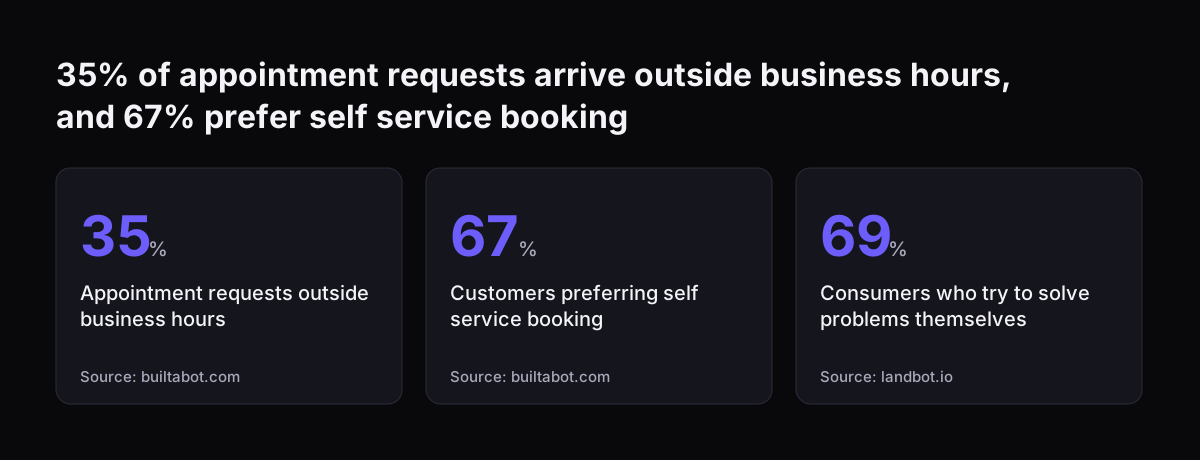
The case rests on when and how people want to contact you. BuiltABot, a scheduling software company, states that 35% of appointment requests arrive outside business hours. It also states that 67% of customers prefer self-service booking over phone calls. It puts manual scheduling at more than 8 touchpoints per appointment, the familiar phone tag.

Landbot, which sells chatbot software, cites Zendesk research showing that 69% of consumers try to solve a problem themselves before contacting support. Treat vendor figures as indicators, not forecasts for your business. They still point one way. A visitor who can get an answer and a slot at nine in the evening has less reason to look elsewhere by morning.

Public sector projects give firmer evidence. Derby City Council added a digital helper, Darcie, to its website in April 2023 and later rolled a version out to its phone system. By January 2025 it had taken around 765,000 calls, and about half were transferred to human staff. The second figure matters as much as the first. An assistant that knows when to pass a conversation on is doing its job.

A poor assistant carries a real cost. BuiltABot cites a Gartner survey in which only 27% of customers would use a chatbot again after a negative experience. One bad first answer can cost you more than the question it failed to handle.

35% of appointment requests arrive outside business hours, and 67% prefer self service booking: Appointment requests outside business hours 35 %, Customers preferring self service booking 67 %, Consumers who try to solve problems themselves 69 %
Source: builtabot.com, landbot.io

What the assistant answers from

The most important design choice is where answers come from. Grounding means restricting the assistant to a defined body of content, so that it answers from your material rather than from general knowledge. GOV.UK Chat, built by the Government Digital Service (GDS), draws exclusively on guidance published on GOV.UK. Derby's Darcie uses the council's website to answer questions. Both chose a narrow source over a broad one.

For a business, the knowledge base usually has three layers:

  • Public pages: service pages, FAQs, terms and contact details already on your site.
  • Assistant notes: short internal documents written for the assistant. These cover who you serve, which areas you cover and what a first meeting involves.
  • Qualification rules: the criteria that decide whether a visitor is offered a meeting.

Tools differ in how they take this material in. Landbot's knowledge base, for example, accepts an uploaded PDF, pasted text or a URL to crawl. It also lets you assign different sources to different channels. Whichever tool you use, the principle holds. If a fact is not in the knowledge base, the assistant says it does not know and offers a person.

GDS also gave Chat the ability to ask a clarifying question when a query is ambiguous. That is worth copying, because a short question beats a confident wrong answer. Finally, give the knowledge base a named owner. Pages change and services end. An assistant grounded in last year's content will give last year's answers with full confidence.

What it may never promise

Write a short list of things the assistant may never say, and test every release against it. The list below is a starting point. Adjust it to your sector.

  • Prices or quotes that are not published on your pages.
  • A delivery date, a completion date or a result.
  • Availability it has not read from the live calendar.
  • Legal, tax, medical or financial advice that needs a qualified person.
  • Discounts, refunds or exceptions to your terms.
  • Anything about another customer.

The reasoning is simple. To a visitor, a sentence from your website assistant is a sentence from your company. If it promises a price, the customer will expect that price.

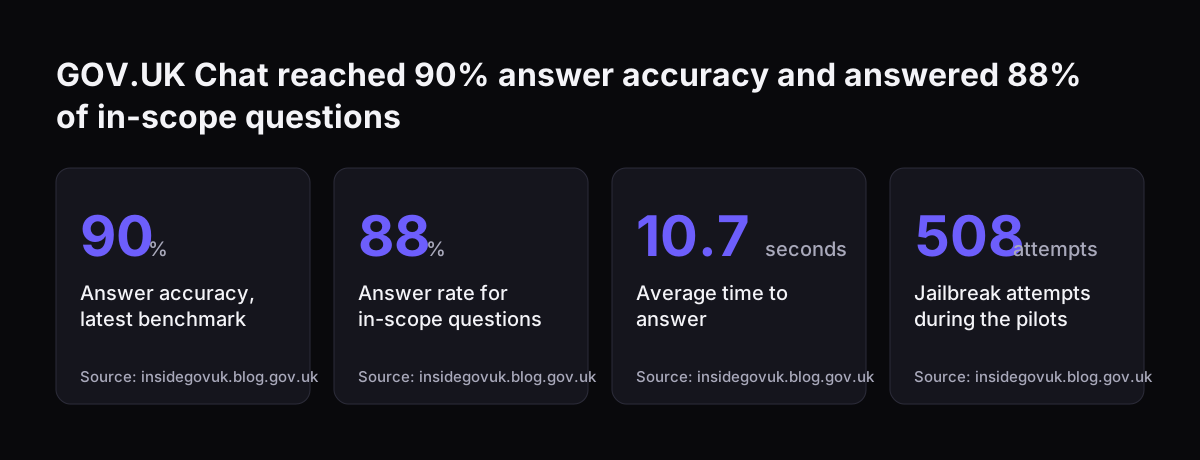
Expect people to test the limits. A jailbreak is an attempt to trick an AI system into giving an inappropriate or harmful response. During its two public pilots, GOV.UK Chat faced 508 such attempts, and GDS reports that its safety guardrails prevented all of them. Your site will see far fewer, but the same method applies. You need instructions that refuse off-topic requests and a fixed reply for anything out of scope. You also need a set of hostile test questions that you run before launch and after every change.

Handover to a person

A handover rule decides when the assistant stops. Define three kinds before you build anything.

To a person, for the question

Use this when a question falls outside the knowledge base, when a visitor complains, asks for a human or shares something sensitive. Derby puts the principle plainly: "If Darcie can't help, your call will be directed to the right person." Route the conversation to a named team, with the transcript attached, so that nobody has to ask the visitor to repeat themselves.

To the calendar, for the qualified visitor

Use this when the visitor meets your qualification rules and wants to talk. The next section covers the mechanics.

To your pages, for everyone else

Some visitors are not a fit. They get a polite, accurate answer and links to relevant pages, but no meeting offer. This protects your team's diary.

At Svennis we write the handover rules as a one-page table with the client's sales and service leads before the first prompt is drafted, because disputes about who owns which conversation are easier to settle on paper than in production. Do not hide the handover from the visitor either. Tell them who will reply, and state your real service hours rather than a promise of an instant response.

Every conversation ends in one of three handovers: a person, the calendar or your pages
To a personTo the calendarTo your pages
When it appliesOutside the knowledge base, a complaint or a request for a humanThe visitor meets your qualification rules and wants to talkEveryone else
What the assistant doesRoutes the chat to a named team with the transcript attachedWrites the lead to Zoho CRM, then books in Zoho BookingsPoints the visitor to the relevant published page
What the visitor getsA person who already has the conversationA meeting slot read from the live calendarAn answer they can read straight away

Writing the lead into the CRM and booking the meeting

Once a visitor qualifies, the assistant does two things in a fixed order. It writes the lead, then it books the meeting. If the booking fails, you still have the contact.

The lead record

Keep the fields few. By default, BuiltABot's assistant collects name, email, phone number and appointment type, which is a sensible minimum. Add the service the visitor asked about, a short summary of the conversation, the answers to your qualification questions and any consent the visitor gave. Read the email address back before saving it. If you later add voice, Appointify notes that speech recognition makes errors with names, addresses and email addresses, so confirmation becomes essential.

The booking

The assistant should offer only slots it has read from the live calendar, and confirm only once the booking is recorded. Two settings prevent most diary problems. Buffer times are automatic padding between appointments, such as 15 minutes. A lead time requirement is minimum advance notice, such as two hours, which stops last-minute bookings. BuiltABot describes Calendly as a standalone page that takes customers away from your website. Offering slots inside the chat keeps the visitor with you.

Connecting Claude

Claude is available through the Claude API, with keys, usage and billing managed in the Claude Console. It can also run through Amazon Bedrock, which is what GOV.UK Chat uses. Keep a small integration layer between the model and Zoho, so that the model proposes each action and your code carries it out. Our overview of AI automation for growing businesses explains that pattern in more depth.

A worked example: an accountancy practice at nine in the evening

Take a UK accountancy practice that offers bookkeeping, year-end accounts and payroll. A café owner opens its site one evening. This is how the conversation runs if you follow this guide.

  1. The visitor asks whether the practice runs payroll for cafés. The assistant answers from the payroll service page and adds nothing that is not on it.
  2. The visitor asks what it costs. The page publishes no fees, so the assistant explains that fees depend on scope and are confirmed in a first call. It gives no figure.
  3. The assistant asks the two qualification questions from its rules: which service is needed, and is the business based in the UK. The visitor fits.
  4. It asks for name, email and phone number, then reads the email address back for confirmation.
  5. It creates a lead in Zoho CRM with the source set to the website assistant, the service set to payroll and a two-line summary of the chat.
  6. It offers slots from Zoho Bookings that respect the two-hour lead time and the 15-minute buffer. The visitor picks one, and the confirmation appears only after the booking is saved.
  7. Had the visitor mentioned a dispute with HMRC, the assistant would have handed over to a person and made no meeting offer.

Nothing in this exchange needs the assistant to improvise. Each reply comes from a page, a rule or the live calendar. For more on this sector, see AI for accountants.

The decisions in one table

Use this table as the build checklist. Every row needs a named owner and a written answer before launch.

StageWhat you decideWhat you check before launch
Knowledge baseWhich pages and notes the assistant may readEvery answer traces back to a source
ScopeTopics it answers and topics it declinesOut-of-scope questions get the fixed reply
Never-promise listPrices, dates, advice and exceptions it must not giveHostile test questions fail to extract a promise
QualificationThe questions and criteria for a meeting offerUnqualified visitors are not offered slots
HandoverWho receives which conversations, and howThe transcript reaches the right team
Data protectionWhat the chat tells visitors before it asks for their details, your lawful basis, your processor terms and how any transfer outside the UK is coveredA short privacy notice and link appear in the chat before any details are collected
Lead captureFields written to Zoho CRMEmail is confirmed and no extra data is stored
BookingMeeting types, buffers and lead timesOnly live slots are offered, and confirmation follows the saved booking
MeasuresWhat you report and how oftenA baseline exists before launch

If a row has no answer, the assistant is not ready. Fill the gap first, because a gap in the rules becomes an improvised answer in front of a customer.

Guardrails and the measures that show they work

Guardrails are the rules and checks that keep the assistant inside its scope. You can only tell whether they work if you measure. GDS gives a useful model: it assesses answers with a combination of subject matter experts and automated evaluation tools. With that approach it raised answer accuracy from 76%, its earliest benchmark, to 90% across all topics.

Track a small set of measures from day one:

  • Accuracy: a sample of answers reviewed each week by someone who knows the service.
  • In-scope answer rate: the share of in-scope questions the assistant actually answers. GOV.UK Chat reports 88%.
  • Response time: GOV.UK Chat averages 10.7 seconds per answer. GDS notes a current trade-off between speed and accuracy. Answer streaming, where the first part of an answer appears before the rest is written, makes waits feel shorter.
  • Handover rate: read it alongside Derby's experience, where about half of calls went to staff. A high rate is not failure if the handovers are correct.
  • Bookings and no-shows: BuiltABot gives an average no-show rate of 20% to 30% without automated reminders, so send reminders.
  • CRM quality: duplicate or incomplete leads created by the assistant.

Review the measures together. A rising booking count with falling accuracy is a warning, not a success.

GOV.UK Chat reached 90% answer accuracy and answered 88% of in-scope questions: Answer accuracy, latest benchmark 90 %, Answer rate for in-scope questions 88 %, Average time to answer 10.7 seconds, Jailbreak attempts during the pilots 508 attempts
Source: insidegovuk.blog.gov.uk

What this means for a UK business

A website assistant that writes leads into a CRM processes personal data, so UK data protection law applies. The ICO's guidance for small organisations sets out the core test. You need a good reason, a lawful basis, for collecting and storing a visitor's details as well as for passing them to anyone else. The ICO notes that this guidance is under review following changes made by the Data (Use and Access) Act, so check the current version before you launch.

Several points map directly onto this build:

  • Share only what a recipient needs. The ICO gives the example of a retailer acting unlawfully by passing full customer records, payment details included, to a delivery company.
  • Consent for marketing does not extend to third party companies unless that is specifically stated.
  • Assess the risks and put security in place, such as strong passwords and limited access.
  • Zoho, your AI provider and your hosting provider process visitor data on your behalf, so UK GDPR requires a written processor contract with each of them. Check that their data processing terms are in place before launch.
  • Sensitive information, such as a medical condition, needs a specific legal condition to use it as well as extra steps to keep it safe, so the simplest rule is to hand those conversations to a person.

BuiltABot also advises confirming how data is processed, and which subprocessors are involved, before any health information passes through an AI system. The public sector is already running this kind of service. The latest GOV.UK Chat runs on Claude models through Amazon Bedrock. A 2024 Local Government Association report, cited by Derby, says over 60% of UK councils are using or exploring AI. For the legal overview, read AI law in the UK and what applies to your business.

Practical next steps

You can do most of the preparation without writing any code. Work through these steps in order.

  1. List your top questions. Pull the questions your team answers most often from email and phone notes, and check that each one has an answer on a published page.
  2. Write the never-promise list. Agree it with whoever owns pricing and terms.
  3. Write the qualification rules. Keep them to a few questions a visitor can answer in one line.
  4. Draw the handover table. Name a team and a response window for each type of conversation.
  5. Set up the diary. Define meeting types, buffer times and lead times in Zoho Bookings before the assistant touches it.
  6. Decide the CRM fields. Choose the minimum set, and include source and consent.
  7. Record a baseline. Note current enquiry volumes, out-of-hours enquiries and no-shows so that you can compare after launch.
  8. Test with hostile questions. Do this before launch, then weekly for the first month.

If you want to see how this assistant sits alongside other uses, such as email triage or quoting, browse AI by business task and pick the task closest to your own enquiry flow.

Sources

  1. 1. GDS, Inside GOV.UK: 5 things we learned testing GOV.UK Chat
  2. 2. Derby City Council: Meet Darcie our digital helper
  3. 3. ICO: Data sharing, when is it unlawful?
  4. 4. Claude Help Center
  5. 5. Landbot: AI FAQ Chatbot
  6. 6. BuiltABot: AI Scheduling Assistant, 24/7 Booking Guide
  7. 7. Appointify AI: website voice chatbots that book meetings

Related articles