
Svennis AI
10 min read

Claude connected to Zoho CRM for reporting: a practical setup guide

Part 1 of 3 on reporting from Zoho CRM with Claude: how the connection works, what to expose, and how to check the first figure against a Zoho CRM report.

Abstract lines converging from a scattered grid into one steady point, suggesting many records becoming one trusted figure

What this guide covers

This guide explains how to get Claude connected to Zoho CRM for reporting. The goal is that a manager can type a plain question, such as "how much open pipeline has gone quiet?", and get an answer that matches the CRM to the deal.

It is part 1 of a three-part series on reporting from Zoho CRM with Claude. This part covers the connection and the first number anyone should trust. You will learn what a connector and an MCP server are, which modules and fields to expose, what Claude can and cannot do, and how to check one figure against a Zoho CRM report. Part 2 turns that trusted figure into a regular set of management questions. Part 3 covers keeping the answers right as your CRM changes.

The connection itself is rarely the hard part. What decides whether the answers are right is data access, permissions and field hygiene. If you want the click-by-click installation, our step-by-step guide to connecting Claude to Zoho CRM with MCP covers it. This post stays on reporting.

By the end you should have one key performance indicator, calculated by Claude and confirmed in Zoho CRM, that your sales manager is willing to act on.
The terms you need first

A few words recur throughout this guide. Here they are in plain language, taken from the vendors' own definitions.

  • Model Context Protocol (MCP). Zoho describes it as the open protocol that defines how AI agents communicate with business systems. It is a standard, not a product.
  • MCP server. A service that exposes tools, actions and contextual data from an application so an AI agent can understand and act on them. For Zoho CRM, a tool might search deals or run a query.
  • Tool call. Claude asks the server to run one of its tools and receives the result. For reporting, this is how Claude reads your data.
  • Connector. The entry inside Claude that attaches an MCP server to your account. The Claude Marketplace currently lists 850 connectors.
  • OAuth. The sign-in method that lets you grant access to Zoho without handing over a password. Zoho's API documentation covers it in steps from registering a client to refreshing and revoking tokens.

Zoho draws one more distinction worth knowing. In its words, "MCP is the protocol" and Zoho MCP "is the product that lets you stand up agent-ready endpoints". Zoho MCP is model-agnostic, so it does not depend on Claude or any other specific model. You can build a server there and point Claude at it.

The routes from Claude to Zoho CRM

There are several ways to make the connection. They differ mainly in whether Claude can write to the CRM, how much of your data they cover, and who maintains them. The table summarises what each vendor's page says.

RouteRead or writeWhat the vendor page saysSuits
Zoho CRM connector in Claude's directoryRead and write, as described on Adzviser's comparison pageAdded from Claude's connector directory by authorising your Zoho organisation; can create leads, update supported deals and add follow-up workTeams that will later want Claude to act, not only report
Your own server built in Zoho MCPThe tools you defineServers, tools and authentication configured through a UI with minimal code; agents run under user-level permissionsFirms that want to decide exactly which actions exist
AdzviserRead only14 supported metrics and 114 breakdowns; a 14-day trial for $0.99, then priced by number of data sourcesReporting only, mixed with advertising data
Windsor.aiPulls data into Claude168 metrics and 720 dimensions; free plan with no credit cardMarketing return across 350+ sources
CData Connect AIQuestions and actionsPasses SQL operations, including filters and JOINs, to Zoho CRM without copying the data to a databaseTeams comfortable with SQL
Claude API MCP connectorTool calls onlyServer must be public over HTTPS; you handle OAuth yourselfDevelopers building their own reporting app

If part of your business runs on another CRM, the same choices apply. See Claude with HubSpot or Salesforce via MCP.

Permissions decide what Claude can see

Zoho states that agents "operate under user-level permissions, so they can only perform actions that the user is authorized to do". In practice, the person who authorises the connection sets the ceiling. If a director with full access connects, Claude can reach everything that director can reach.

For reporting, connect through a user whose access matches what you want exposed and nothing more. That keeps the scope visible in one place, inside Zoho CRM, where your administrator already manages access. It also has a reporting benefit: you know exactly which records Claude can count.

Read only or read and write

A reporting setup should not change data. Adzviser's route is read only, and its page states that Claude "cannot change anything in Zoho CRM" through it. Zoho's own connector, by the same page's account, is read and write. If you use a write-capable route for reporting, decide in advance which write actions you will allow, and switch off the rest where the route lets you. On the Claude API, an object called the MCPToolset sets which tools from a server are enabled.

Tokens and revocation

OAuth access is granted with tokens, and Zoho's documentation includes a step for revoking them. Put that step in your leaver process. When the person who authorised the connection leaves, revoke and reconnect under a current user.

Which modules and fields to expose, and which to hold back

Managers' reporting questions mostly concern pipeline, sources and owners. They rarely need a customer's phone number or the text of a sales note. Expose what the questions need and hold back the rest.

Expose for pipeline reportingHold back unless a question requires it
Deals: name, Deal Stage, value, closing date, owner, Last Activity DateNotes and email content
Accounts: name and the fields you group by, such as sector or regionPersonal contact details of individuals
Leads: source and statusFree-text fields where staff record sensitive remarks

There is a data reason as well as a tidiness one. Anthropic's documentation states that data exchanged with MCP servers, including tool results, is kept under its standard retention policy, and that the MCP connector is not covered by zero data retention arrangements. Whatever you expose can leave Zoho in a tool result.

Field hygiene before the first question

Claude reports what the fields contain. Check that stage values are used consistently, that open deals do not carry closing dates in the past, that every deal has an owner and that accounts are not duplicated. Zoho's Metadata APIs fetch the definitions of modules, fields, layouts and custom views, so a connection that uses them can tell Claude what each field means.

At Svennis we start every reporting connection by listing the fields that the managers' questions actually need, and we clean those fields before anyone asks Claude anything. A clean connection on untidy data still gives wrong answers.

What Claude can read and what it cannot do

Claude reads your CRM only through tool calls. Anthropic's documentation for the MCP connector says that, of the MCP specification's features, "only tool calls are currently supported". If a tool does not exist on the server, Claude cannot do that thing, however the question is phrased.

The same page makes a point that trips up new users: "Claude does not call an MCP tool for general knowledge questions about a connected service." Ask "what does a deal stage mean?" and you get a general answer, not your CRM. Name your data in the question, for example "in our Zoho CRM deals", so Claude goes to the tools.

Underneath, Zoho CRM offers the means for serious reporting. Its Query API fetches records with SELECT statements in SQL syntax, called COQL, and the V8 documentation covers JOINs and subqueries. Bulk APIs retrieve large volumes asynchronously. Whether your connector uses these depends on how it was built, which is one reason to test before trusting it.

Claude can also get things wrong: pick the wrong date field, include closed deals or miss a filter. CData's guide notes that Claude outlines the steps it uses to retrieve data. Read those steps every time while you are testing. All current Claude models support tool use, and Anthropic's models overview suggests starting with Claude Opus 5.5 if you are unsure which to use.

For developers on the API, one setting matters for consistent reports. A beta header, mcp-client-2026-09-15, lets you pin a server's tool list, so a change on the server does not alter what Claude sees partway through a conversation.

A worked example: stalled pipeline value

Take one KPI from pipeline data and run it end to end. Windsor.ai's page gives a useful starting case: using the Last Activity Date and Deal Stage fields to flag deals that have not moved in over 14 days. Call it stalled pipeline: open deals with no activity for more than 14 days, counted and valued by stage.

  1. Write the definition in one sentence and agree it with your sales manager. Decide which stages count as open. Closed won and closed lost stages are excluded.
  2. Ask Claude in words that point at your data. Use the prompt below.
  3. Read the steps Claude reports. Check the module, the date field, the 14-day cut-off and the stages it excluded.
  4. Take the output as a table with one row per stage: number of deals and total value.
  5. Check it in Zoho CRM before anyone acts, as the next section describes.
Using our Zoho CRM deals, list open deals whose Last Activity Date is more than 14 days before today. Exclude deals in closed stages. Group by Deal Stage and give the number of deals and the total deal value for each stage. Then tell me which fields and filters you used.

The last sentence of the prompt matters most. It makes Claude show its working, so you can spot a wrong filter in seconds rather than after a sales meeting.

Once the definition is agreed, keep it where every manager's questions can use it. A Claude project works well for this; our guide to Claude Projects and Skills for a small team shows how to set one up.

Check the figure against a Zoho CRM report

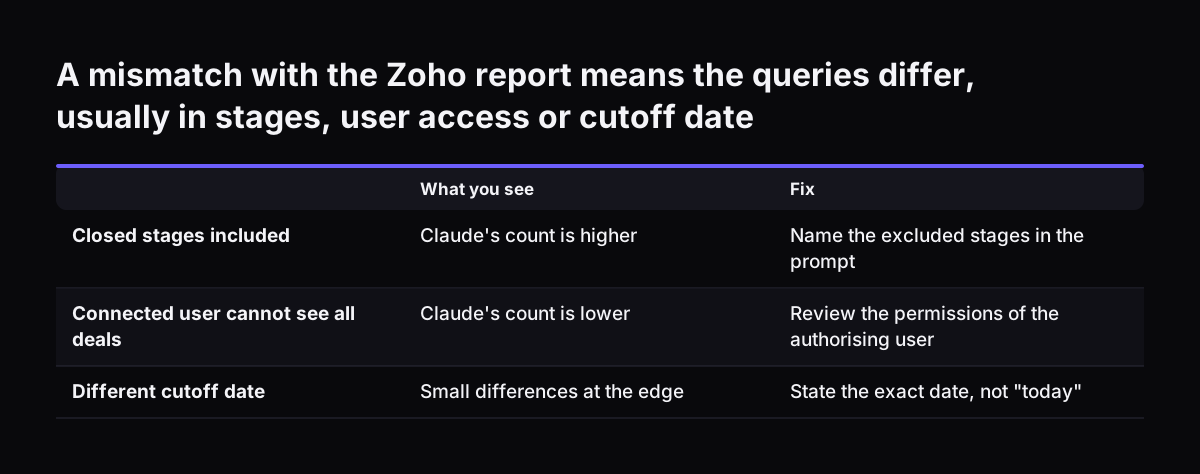
Build the same query in Zoho CRM itself, as a report or a custom view with identical filters: the same stages, the same Last Activity Date cut-off, the same owner scope. Compare the deal count per stage first, then the value per stage. For a definition this precise, the numbers should match exactly. A difference is not rounding; it is a sign that the two queries are not the same.

Cause of mismatchWhat you seeFix
Closed stages includedClaude's count is higherName the excluded stages in the prompt
Connected user cannot see all dealsClaude's count is lowerReview the permissions of the authorising user
Different cut-off dateSmall differences at the edgeState the exact date, not "today"
Data copied rather than liveRecent changes missingCheck how often your connector refreshes
Duplicate accounts or dealsTotals inflated in bothClean the records, then re-run both

The last cause shows why the check matters. The routes differ here: Adzviser describes real-time access, Windsor.ai describes pulling and streaming data into Claude, and CData queries Zoho CRM without copying it. Know which you have.

Set a simple rule: nobody acts on a Claude figure until the count and value match the Zoho CRM report. Record the date of the check and the agreed definition. When the definition changes, check again.

A mismatch with the Zoho report means the queries differ, usually in stages, user access or cutoff date. What you see / Fix. Closed stages included: Claude's count is higher / Name the excluded stages in the prompt; Connected user cannot see all deal

What this means for a UK company

Three points apply to a business running Zoho CRM from the UK.

Data leaving the CRM. Tool results pass through Anthropic and are kept under its standard retention policy, with no zero data retention cover for the MCP connector. That is the practical case for holding back personal data you do not need for reporting. Zoho's V8 API documentation includes a section on GDPR compliance, and our GDPR checklist for Claude covers the questions to settle before rollout.

Clean company records. Duplicate accounts distort any report grouped by customer. Companies House offers an API that retrieves information about limited companies and other companies within the Companies Act 2006, and the data it returns is live. Matching your CRM accounts to registered company details is a sensible way to find duplicates before you report on them.

Costs in dollars. Anthropic lists API prices in US dollars per million tokens; Claude Opus 5.5, for example, is $4 per million input tokens and $20 per million output tokens. Adzviser's trial is also priced in dollars. Budget in sterling with that in mind, and remember that the reporting routes differ in how they charge: Windsor.ai by connected accounts and sources, Adzviser by data sources.

Next steps

You can do the first round of this work in a few sessions. Keep to this order.

  1. Choose a route. Use the table above. For pure reporting, prefer a read-only route or switch off write tools.
  2. Set up access. Connect through a user whose Zoho CRM access matches what you want Claude to see.
  3. List and clean the fields. Deal Stage, value, closing date, owner and Last Activity Date come first. Hold back notes and personal details.
  4. Run the stalled pipeline KPI. Use the prompt in this guide and read the steps Claude reports.
  5. Reconcile it with a Zoho CRM report. Match count and value per stage exactly, then record the definition and the date.
  6. Plan your regular questions. Write down the five questions your managers ask most often; part 2 of this series builds on them.

If you want to see where Claude fits in wider management reporting, read our page on AI for reporting and analytics. It sets out the kinds of questions worth automating once your first figure has been checked.

Sources

  1. 1. Zoho CRM V8 APIs
  2. 2. MCP connector, Claude Platform Docs
  3. 3. Connectors and plugins, Claude Marketplace
  4. 4. Models overview, Claude Platform Docs
  5. 5. Zoho MCP
  6. 6. Companies House Developer Hub
  7. 7. Connect Zoho to Claude, Windsor.ai
  8. 8. Connect Zoho CRM to Claude, Adzviser
  9. 9. Use Claude to Talk to Your Zoho CRM Data via CData Connect AI

Related articles