
Svennis AI
10 min read

Running AI agents in production with approvals, logs and cost control

An AI agent is ready for production once it has three controls: human approval for consequential actions, logs that trace each decision, and a cost ceiling agreed before launch.

Abstract flowing lines passing through three gates, with a steady path emerging on the far side

Running AI agents in production needs approvals, logs and a cost ceiling

Running AI agents in production, with approvals, logs and cost under control, rests on three controls. The first is human approval before any consequential action. The second is logs that let you trace every decision. The third is a cost ceiling agreed before launch, not after the first invoice. If any of the three is missing, the agent is still a pilot.

This guide is part 3 of a three-part series on AI agents in practice. Part 1 covers building a first agent without code. Part 2 covers building one with the Claude Agent SDK. This part covers running agents safely and at a known cost once real customers and real data are involved.

An AI agent is a model that uses tools to carry out a task on your behalf, such as reading a ticket, drafting a reply or updating a record. An agent in production is one that does this on live data, without someone watching every step. That last point is why the three controls matter. When nobody is watching each step, the controls do the watching.

The sections below take each control in turn. They then walk through a worked example and the EU and UK rules. They end with a checklist you can use before launch. If you want the wider picture first, the overview of AI automation for growing businesses explains where agents fit among simpler automations.
Human approval for consequential actions starts with read tools and write tools

Human approval belongs on the actions that change something, not on the actions that only look. Anthropic's help centre splits an agent's tools into two kinds. Read tools let Claude access and read content, such as an email inbox or a screenshot. Write tools let Claude act in your environment, such as creating a calendar invite, deleting a file, running a command or clicking on the screen.

Write tools carry more risk, because their effects land in your systems. Anthropic's framework for safe and trustworthy agents says humans should keep control over how their goals are pursued, above all before high-stakes decisions. Its own example is simple. A user can decide that reading a calendar is always safe, but still require approval before an invitation goes out.

Apply the same test to your agent. List every tool it can call. Mark each one as read or write. Then ask of each write tool what the worst plausible outcome would be if it ran on the wrong record.

A wrong internal note costs a minute. A wrong refund or a wrong email to a customer costs far more.

Responsibility does not move to the software. The Cowork help article states that you remain responsible for all actions Claude takes on your behalf. That includes purchases, messages sent and actions by scheduled tasks. The approval list is where you decide which of those actions a person signs off first.

Approval settings in Claude: Always allow, Needs approval or Blocked

On the Claude Team and Enterprise plans, the owner sets each connector action to one of three states for the whole organisation. A connector is the link between Claude and another system, such as your helpdesk or CRM. The three states are Always allow, Needs approval and Blocked, and users cannot override the owner's choice.

A sensible default follows the read and write split:

  • Always allow for read actions on data the agent needs, such as searching tickets.
  • Needs approval for write actions a customer or supplier will see, such as sending a reply.
  • Blocked for actions the agent has no reason to take, such as deleting records.

Claude Cowork adds its own approval modes. In "Automatically approve" mode, Claude still reviews each action for safety before it runs. In "Skip all approvals" mode, nothing checks its actions. Cowork always asks for explicit permission before permanently deleting files, in any mode.

Two Cowork features need extra care. Computer use has no sandbox between Claude and your screen, and scheduled tasks run on their own even when your computer is off.

Approvals also limit prompt injection. Prompt injection is an attack in which instructions hidden in content the agent reads try to steer it. The Cowork safety article notes that such an attack needs both untrusted input and actions that could harm you. A human approval step removes the second half on the actions that matter.

Logs that trace every agent decision: OpenTelemetry and audit logs

A production agent needs logs that show what it was asked, which tools it called and who approved what. Without them, you cannot explain a wrong action to a customer, an auditor or yourself. Claude offers two log sources, and they answer different questions.

OpenTelemetry is an open standard for sending monitoring data to the tools you already use, such as a SIEM (security information and event management system) or an observability platform. On Team and Enterprise, once an admin sets an endpoint, Claude Cowork streams activity through OpenTelemetry. The stream covers prompts, tool calls, human approval decisions, tokens and estimated cost. Cowork on mobile and web is also captured in the Compliance API.

Audit logs record administrative and account activity across the organisation. They are available on the Enterprise plan only, and audit log exports cover 180 days. If you need a longer history, export on a schedule and keep the files in your own storage.

Decide three things before launch. Decide where the logs go. Decide who reads them and how often. Decide how long you keep them. A log nobody reads is only slightly better than no log, because you will open it for the first time during an incident.

A cost ceiling agreed before launch: spend limits and model prices

The cost ceiling is a monthly figure the business agrees before the agent goes live, enforced by the platform rather than by memory. In the Claude Console, a company can set its own monthly spend limit below its tier's cap. The workspaces documentation explains that each workspace can have its own limits and alerts. Give each agent its own workspace, so one runaway job cannot spend another team's budget.

Model choice sets most of the cost. The models overview lists these prices in US dollars, excluding tax, per million tokens (MTok). A token is a small chunk of text, roughly part of a word.

ModelInput per MTokOutput per MTokContext window
Claude Fable 5.1$10$501M tokens
Claude Opus 5.5$4$201M tokens
Claude Sonnet 5$2$101M tokens
Claude Haiku 4.5$1$5200K tokens

Anthropic suggests starting with Claude Opus 5.5 for most workloads if you are unsure. It keeps Fable 5.1 for demanding, long-horizon agentic work. Prompt caching and batch processing lower the bill further for repeated context and for work that can wait. Check retirement dates too: Claude Haiku 4.5 is listed for retirement not sooner than 15 October 2026, so do not build a new agent on it.

Testing an agent before launch with 20 to 50 real tasks

An agent is ready to launch when it passes a fixed test set drawn from real work, not when a demo looks good. Anthropic's post on evals for AI agents says 20 to 50 simple tasks drawn from real failures are a great start. An eval is a repeatable test that scores the agent's output against what a correct answer looks like.

Build the set from your own history. Take tickets, emails or orders your team handled last quarter. Include the awkward ones: the duplicate, the angry customer, the request that belongs to another team. Record the right outcome for each. Run the set before launch and again after every change to the prompt, the tools or the model.

Consistency matters more than a single good run. The same Anthropic post gives an example. A customer-facing agent that succeeds 75 percent of the time on each try succeeds three times in a row only about 42 percent of the time. A customer who writes three times will notice.

So measure repeated runs, not one. If the pass rate on repeated runs is too low, tighten the instructions or the tools first. Moving to a larger model comes second, and the cost table shows why.

Worked example: a Zoho Desk triage agent with approvals, logs and a budget

Take a service team that wants Claude to triage tickets in Zoho Desk. The agent reads each new ticket, sets a category, suggests a priority and drafts a reply. The company is on the Claude Team plan and connects Zoho Desk through a connector.

Approvals

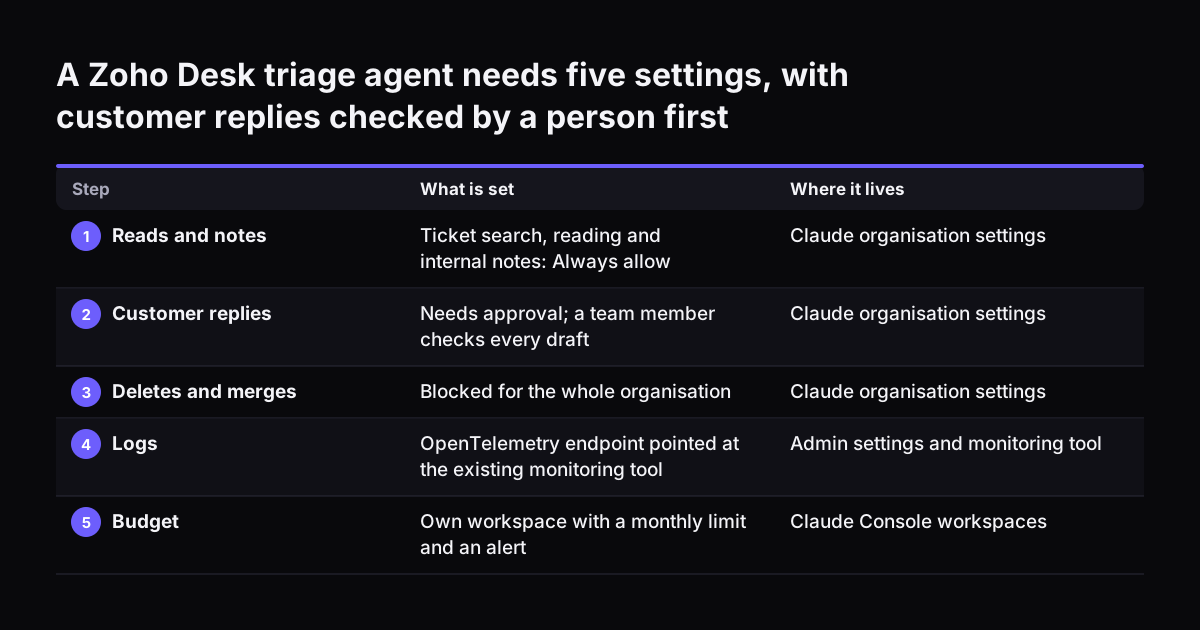
The owner sets searching and reading tickets to Always allow. Adding an internal note is also Always allow, because only staff see it. Sending a reply to the customer is Needs approval, so an agent on the team checks every draft. Deleting or merging tickets is Blocked.

Logs

An admin points the OpenTelemetry endpoint at the company's existing monitoring tool. Every tool call and every approval decision now appears there, with tokens and estimated cost. The service manager reviews a sample each Friday.

Budget

Assume 2,000 tickets a month, each using about 20,000 input tokens and 1,000 output tokens. On Claude Sonnet 5 that is 40 million input tokens at $2, or $80, plus 2 million output tokens at $10, or $20. The total is about $100 a month. The same load on Claude Opus 5.5 would be about $200. If the team later runs the agent on the API, it sits in its own workspace with an alert near $100 and a hard limit a little above.

At Svennis we write the approval list and the spend limit into the launch sign-off before the first live ticket. The failure we see most often is a write action added after launch that nobody reclassified from Always allow.

A Zoho Desk triage agent needs five settings, with customer replies checked by a person first. What is set / Where it lives. 1. Reads and notes: Ticket search, reading and internal notes: Always allow / Claude organisation settings; 2. Customer repli

EU AI Act and UK rules for a company running its own agent

For a company in Germany, Romania or Italy, two parts of the EU AI Act touch a production agent. The EU AI Act applies wherever the agent is used in the EU or its output reaches people there. So a UK company serving EU customers can be covered too. For a UK company serving only UK customers, there is no AI Act. Your existing duties on data protection and consumer law still apply to what the agent does.

Article 4 covers AI literacy. As amended by Regulation (EU) 2026/1744, in force since 27 July 2026, it requires providers and deployers to take steps to support their staff's AI literacy, but it does not set a required level. The Commission's AI literacy questions and answers say no certificate is needed. In practice, the people who approve the agent's actions and read its logs should understand what it can and cannot do.

Article 50(1) covers transparency for AI systems that interact with people. It applies from 2 August 2026 and binds the provider of the system. The Commission's FAQ on Article 50 transparency obligations sets out what that involves. A company that builds its own customer-facing agent may itself be the provider of that system, not only a user of Claude. Whether that applies to you is a point to confirm with a lawyer before launch.

Whichever country you are in, the three controls help. Approvals show human oversight. Logs show what happened. A budget shows the agent was run on purpose.

Production checklist for AI agents: six controls to confirm

Before an agent goes live, confirm each of these six controls and write down who holds it. The table works as a sign-off sheet.

ControlWhat to decideWhere it lives
OwnerOne named person accountable for the agent's actions and budgetLaunch sign-off
ApprovalsEach connector action set to Always allow, Needs approval or BlockedClaude organisation settings
LogsOpenTelemetry endpoint, audit log exports, retention period, reviewerMonitoring tool and your own storage
Spend limitMonthly ceiling and alert level, one workspace per agentClaude Console workspaces
Test set20 to 50 real tasks with known right answers, run on every changeShared folder or eval tool
Monthly reviewPass rate, spend against ceiling, approvals refused, new write actionsDiary entry for the owner

The monthly review is the control teams drop first. Put it in the owner's calendar before launch. Use it to check three numbers: the pass rate on the test set, the spend against the ceiling, and how many approvals were refused. A rising refusal rate tells you the agent is drifting before a customer does.

Next steps for putting your first agent into production

Start with one agent and one process. Fill in the checklist for it before you widen the scope. Pick a process with clear right answers and a modest cost of error. Ticket triage and invoice matching are good examples.

  1. List the agent's tools and mark each one read or write.
  2. Set every connector action to Always allow, Needs approval or Blocked.
  3. Point logs at a tool someone already checks, and name that person.
  4. Estimate monthly tokens, price them from the models overview and set the workspace limit.
  5. Collect 20 to 50 real past tasks and run them before launch.
  6. Book the first monthly review.

Some processes suit an agent better than others. The guides on AI by business task and AI for accountants show worked options by sector. You may prefer an outside team to run agents for you. If so, the post on how to judge an AI consultancy by results in production sets out the questions to ask.

Sources

  1. 1. Use Claude Cowork safely, Claude Help Center
  2. 2. Monitor Claude Cowork activity with OpenTelemetry, Claude Help Center
  3. 3. Access audit logs, Claude Help Center
  4. 4. Workspaces, Claude Platform Docs
  5. 5. Models overview, Claude Platform Docs
  6. 6. Demystifying evals for AI agents, Anthropic
  7. 7. Our framework for developing safe and trustworthy agents, Anthropic
  8. 8. AI Literacy: Questions and Answers, European Commission
  9. 9. Transparency obligations under Article 50 of the AI Act, European Commission

Related articles