Skip to content
SVENNISAIWe speak Claude.
Blog · Claude API

Cutting Claude API costs with prompt caching in production assistants

Put tool definitions, instructions and knowledge first, then mark them for the cache. A Claude assistant then pays a fraction of the input price on every reuse, and its answers do not change.

10 min read

Book a 30-minute call · with a Claude Certified Architect from our team.

Article · 10 min read
Abstract layered blocks, the lower ones held steady while a thin top layer shifts and renews

Prompt caching cuts Claude API costs by reusing the fixed start of each prompt

Cutting Claude API costs with prompt caching comes down to one rule. Put everything your assistant sends unchanged on every request at the front of the prompt, and mark it for the cache. Prompt caching is the Claude API feature that stores the processed start of a prompt. A later request with an identical start then resumes from that point instead of processing it again.

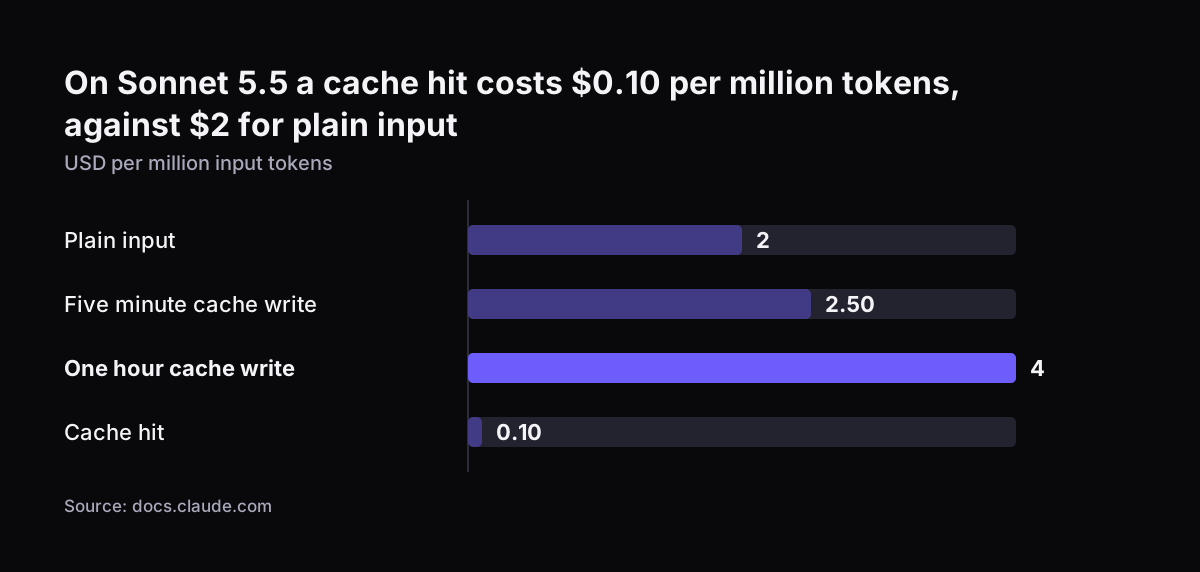
The saving is large on the newest models. On Claude Sonnet 5.5, the base input price is $2 per million tokens. A cache hit on the same model costs $0.10 per million, according to Anthropic's prompt caching documentation. The answers do not change, because Anthropic states that caching has no effect on output token generation.

A production support or sales assistant is a good fit, because most of its prompt is fixed. The tool definitions, the instructions and the product knowledge are the same for every customer, and only the conversation changes. If you are new to the model itself, start with our plain guide to what Claude is. This guide covers what the cache stores, which parts to cache, how long the cache lasts and how to read the saving on the bill. It uses an assistant working on Zoho CRM or a helpdesk as the example.
What prompt caching stores, and what it leaves unchanged

Prompt caching stores the processed state of a prompt prefix. A prefix is the opening part of the request, up to a point you mark. The prefix can include text and images. A cache hit needs that whole segment to be 100 percent identical, up to and including the marked block.

Prompt caching does not store answers. Claude generates each response fresh. Anthropic says the response is identical to the one you would get without caching. Caching therefore lowers cost without touching quality: the model sees exactly the same prompt either way.

Prompt caching has three side effects that matter in production:

  • Speed: requests that resume from a cached prefix skip the processing of that prefix, so they return sooner.
  • Rate limits: cache hits are not deducted against your rate limit, so a busy assistant gets more headroom.
  • Isolation: caches are kept separate between organisations, and another company never shares your cache, even with an identical prompt.

Anthropic supports prompt caching on all active Claude models, in both its automatic and its explicit form. You do not need a special model or a separate contract to use it. You only need to structure the prompt so the fixed part stays fixed.

Which parts of an assistant's prompt to cache: fixed content first, variable content last

Cache the content that is identical on every request, and place it before anything that changes. Caching works on prefixes, so one changed character early in the prompt breaks the match for everything after it.

For a support or sales assistant, the usual order runs from tool definitions to instructions, then knowledge, then the conversation. Tool definitions describe the actions the assistant can take, such as looking up a ticket or a contact. Instructions set the tone, the rules and the escalation paths. Knowledge is the policy text, price list or product sheet the assistant answers from.

The table below sorts the typical parts of a production assistant's prompt.

Part of the promptHow often it changesCache it?Position
Tool definitionsWhen you add or change a toolYesFirst
System instructionsAt a planned releaseYesAfter the tools
Product and policy knowledgeWeekly or monthlyYesAfter the instructions
Earlier turns of the conversationEvery turn, but only by adding to the endYes, with a breakpoint that moves forwardAfter the fixed parts
The customer's latest messageEvery requestNoLast
Today's date, ticket number, user nameEvery requestNoInside the latest message, never in the instructions

Knowledge that changes daily does not belong in the cached prefix. Stock levels are one example. Feed them in through a tool result or the latest message instead.

Cache lifetime: five minutes by default, one hour at a higher write price

A Claude cache entry lasts five minutes by default. Each hit refreshes that lifetime at no extra cost. A support desk that receives a question every few minutes therefore keeps its cache warm all day for the price of one write.

The lifetime runs from the start of the request that writes or reads the entry, not from the end of the response. A long answer with several tool calls uses up part of the window before the next request arrives.

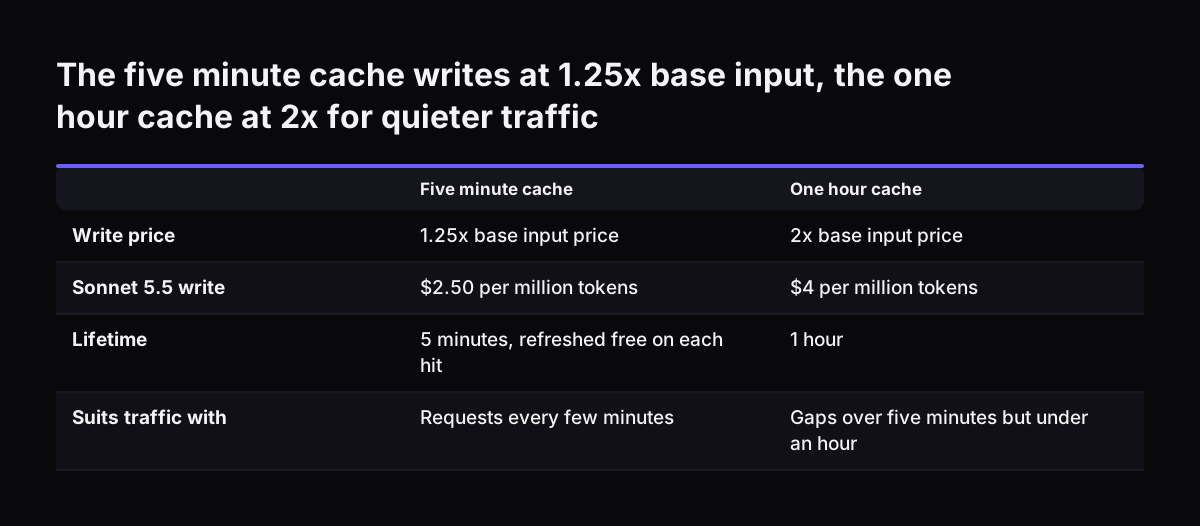
You can choose a one-hour lifetime instead. Writing a one-hour entry costs 2x the base input price, against 1.25x for a five-minute entry. The longer option pays when traffic has gaps longer than five minutes but shorter than an hour. A sales assistant used in bursts between meetings is a typical case.

Anthropic also describes cache pre-warming for the first request of the day. Pre-warming means loading the instructions or tool definitions into the cache before a real user arrives. You send a request with max_tokens set to 0. The API writes the cache at each breakpoint and returns without generating any output. A scheduled pre-warm before the desk opens spares the first customer the slower first answer.

The five minute cache writes at 1.25x base input, the one hour cache at 2x for quieter traffic. Five minute cache / One hour cache. Write price: 1.25x base input price / 2x base input price; Sonnet 5.5 write: $2.50 per million tokens / $4 per million

Cache prices for Claude Opus 5.5, Sonnet 5.5 and Fable 5.2

Cache reads cost a small fraction of normal input, and the exact fraction depends on the model. Anthropic's general rule is 10 percent of the base input price for a read and 125 percent for a five-minute write, with per-model exceptions. Claude Opus 5.5 and Claude Sonnet 5.5 are exceptions: hits cost 0.05x the base input price. Hits on Claude Fable 5.2 cost 0.025x.

The table shows US dollars per million tokens, taken from Anthropic's pricing page and prompt caching page. The Fable 5.2 write prices are worked out from the general 1.25x and 2x multipliers.

ModelBase input5-minute write1-hour writeCache hit
Claude Opus 5.5$4$5$8$0.20
Claude Sonnet 5.5$2$2.50$4$0.10
Claude Fable 5.2$8$10$16$0.20

A five-minute write pays for itself on the first hit. On Sonnet 5.5, the write costs $0.50 per million tokens more than plain input. Every hit then saves $1.90 per million.

Caching leaves output prices untouched. Output costs $10 per million tokens on Sonnet 5.5, $20 on Opus 5.5 and $40 on Fable 5.2. If long answers dominate your assistant's cost, caching helps less.

Claude Haiku 5.5 has its own rule. Anthropic positions it for high-volume classification, extraction and routing. It starts at $0.10 per million input tokens for prompts up to 100,000 tokens and charges more above that size, so keep a Haiku 5.5 router's prompt under it.

On Sonnet 5.5 a cache hit costs $0.10 per million tokens, against $2 for plain input: Plain input 2, Five minute cache write 2.50, One hour cache write 4, Cache hit 0.10 (USD per million input tokens)
Source: docs.claude.com

Worked example: a support assistant on Sonnet 5.5 in front of Zoho Desk

Take a support assistant on Claude Sonnet 5.5 that answers customers and creates tickets in Zoho Desk. The volumes below are an illustration, not a measurement. Suppose the fixed prefix is 20,000 tokens. It holds the tool definitions for searching and creating tickets, the instructions, and the returns and warranty policy. Suppose the assistant handles 1,000 requests a day and traffic never pauses for five minutes.

Without caching, every request pays the full input price for the prefix. That is 20 million tokens a day at $2 per million, or $40 a day.

With a five-minute cache, the first request writes the prefix at $2.50 per million, about $0.05. The other 999 requests read it at $0.10 per million. That is just under 20 million tokens, or about $2. The prefix now costs roughly $2.05 a day instead of $40.

Three caveats keep the example honest:

  • The customer's messages, the conversation history and the output are billed as before, so the saving on the whole bill is smaller than the saving on the prefix.
  • Each pause longer than five minutes costs another write at $2.50 per million.
  • Answer quality is unchanged, because the model receives the same prompt it would without caching.

The same arithmetic works for a sales assistant on Zoho CRM. Swap in its own prefix size, request volume and model price.

Automatic caching or explicit breakpoints: how to mark what Claude caches

You mark what Claude caches with the cache_control field, for example "cache_control": {"type": "ephemeral"}. A breakpoint is the point in the prompt where a cached section ends. You can set breakpoints in two ways.

Automatic caching uses a single cache_control field at the top level of the request. The API places the breakpoint on the last cacheable block and moves it forward as the conversation grows. Explicit breakpoints put cache_control on individual content blocks, so you decide exactly where each cached section ends.

Automatic caching suits a simple chat assistant. Explicit breakpoints suit a production assistant whose parts change at different speeds. You can set up to four breakpoints per request. A sensible layout for a support or sales assistant uses three:

  • one after the tool definitions, which change least often
  • one after the instructions and knowledge
  • one at the end of the conversation history, moved forward each turn

With this layout, a knowledge update forces a new write only from the second breakpoint onwards. The tool section in front of it still matches, so it stays cached.

The lookback rule matters for long conversations. When the API looks for an earlier cache entry, it checks at most 20 positions back from each breakpoint. A long conversation full of tool calls can outrun that window, so keep a breakpoint close to the end of the history.

Why prompt caching fails to hit: dates, edits, clients and short prompts

Most missed caches in production come from one of four causes:

  • Dynamic text in the instructions: a timestamp, session ID or user name in the system prompt makes it different on every call, so no hit is possible.
  • Edits during the day: any change to a cached section, even a single character, forces a fresh write at the higher price.
  • A client that never asks: many third-party clients do not send cache_control at all, so even a static prompt is never cached.
  • A prefix below the minimum: the API processes prompts shorter than the model's minimum cacheable length without caching and returns no error; for Claude Haiku 4.5 the minimum is 4,096 tokens.

The first cause is the most common one we meet. At Svennis we read the cache fields in the logs during an assistant's first week live. When the cache never hits, the usual culprit is a date or ticket number someone added to the top of the instructions. Moving that line into the latest message restores the hits and leaves the answers as they were.

Edits are the second risk. Group instruction changes into planned releases rather than editing the live prompt during working hours. Our guide to changing a live Claude assistant safely covers how to do that without breaking the cache or the answers.

Reading the prompt caching saving in the API usage fields and on the bill

Every Claude API response reports cache activity in its usage data. The usage data splits input into three counts:

  • cache_creation_input_tokens: tokens written to the cache on that request
  • cache_read_input_tokens: tokens retrieved from the cache on that request
  • plain input tokens: the rest of the prompt, billed at the base price

The read count tells you whether caching works at all. If cache_read_input_tokens stays at zero across a multi-turn conversation, caching is not happening. Check the four causes of a missed cache: dynamic text, edits, a client that never asks, or a prefix below the minimum.

You can work out the saving from the same fields. Multiply the read tokens by the difference between the base input price and the hit price. On Sonnet 5.5 that difference is $1.90 per million read tokens. Then subtract the write premium of $0.50 per million written tokens for the five-minute cache. The result is what caching saved over that period.

Log these fields per request, together with the name of the assistant that sent it. You then see which assistant hits its cache and which does not. Our post on a Claude API key for a company covers how to set up keys and keep spending visible.

What prompt caching means for a UK company paying Claude in US dollars

Anthropic prices the Claude API in US dollars, so a UK company sees its cache saving in dollars. Budget in dollars per million tokens, and convert to sterling when you report the month.

The saving shows up differently if you buy through a cloud marketplace. Through Claude Platform on AWS or Claude in Microsoft Foundry, usage is billed in Claude Consumption Units at $0.01 each. Token usage is rated at standard US dollar prices and then converted. Cache reads still cost less than plain input, so the saving appears as fewer units rather than as a separate line.

Where the processing happens can change the price. On recent models, requesting US-only inference through the inference_geo parameter multiplies every token category by 1.1. That includes cache writes and cache reads. A UK company with no reason to require US-only processing gains nothing from setting it.

Isolation answers a common question from data protection leads: another organisation's assistant cannot read from your cached prompt, even if its prompt is identical. Some work does not need an immediate answer, such as overnight document runs. For that work, the Batch API gives a separate 50 percent discount on input and output tokens. Bulk document processing with the Claude Batch API explains when that route fits.

Next steps: check your prompt order, then measure for a week

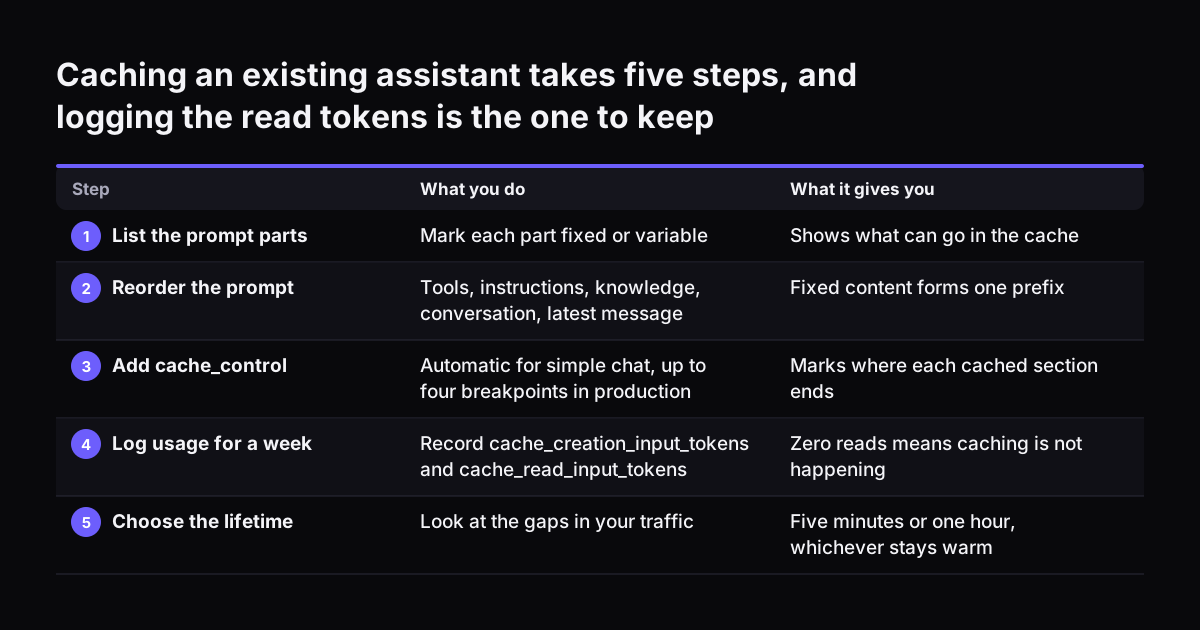
You can apply prompt caching to an existing Claude assistant in five steps:

  1. List every part your assistant sends with each request, and mark each part as fixed or variable.
  2. Reorder the prompt: tool definitions, instructions, knowledge, conversation, then the latest message. Move dates, ticket numbers and user names into the latest message.
  3. Add cache_control: automatic caching for a simple chat, explicit breakpoints (up to four) for a production assistant.
  4. Log cache_creation_input_tokens and cache_read_input_tokens for a week, and work out the saving from them.
  5. Look at the gaps in your traffic, and choose between the five-minute and the one-hour lifetime.

Step four is the one to keep doing. A cache that stops hitting shows up there first, often after a well-meant edit to the instructions.

You may not have an assistant in production yet. In that case, Pilot Claude A puts one AI agent live on Claude for one process, with the prompt order and caching set up from the start. The Pilot is the second of four steps: the Workshop, the Pilot, the department Activation, then monthly operations. The prices for each step are on the prices page.

Caching an existing assistant takes five steps, and logging the read tokens is the one to keep. What you do / What it gives you. 1. List the prompt parts: Mark each part fixed or variable / Shows what can go in the cache; 2. Reorder the prompt: Tools

Sources

  1. Anthropic: Pricing, Claude Platform Docs
  2. Anthropic: Prompt caching, Claude Platform Docs
  3. Anthropic: Models overview, Claude Platform Docs
  4. MindStudio: What Is Anthropic's Prompt Caching and Why Does It Affect Your Claude Subscription Limits?
Free, 30 minutes

Pick a time. Bring the process this article made you think of.

You leave with a clear yes or no on putting Claude on it, and the step that fits from our published prices. You speak to someone who builds the agents, not a salesperson.

Prefer to call? +44 7588 772736 · Not ready to talk? See it on your business first.

30 minutes · video call · free
  1. 1Time
  2. 2Details
  3. 3Booked