
Skip to content
SVENNISAIWe speak Claude.
Blog · Claude Duet

Claude Duet: what the proactive agent does and what UK firms can do meanwhile

Claude Duet is Anthropic's proactive agent, limited for now to US Pro, Max and Ultra subscribers. Here is what it does, where it falls short, and what a UK Team customer can set up today.

10 min read

Book a 30-minute call · with a Claude Certified Architect from our team.

Article · 10 min read
Person seen from behind playing a piano alone on a two-seat bench, with white gloves waiting on the empty seat beside them.

Claude Duet is Anthropic's proactive agent, and UK businesses cannot use it yet

Claude Duet is Anthropic's proactive agent. It is a separate Claude app that checks your connected tools, sends you a morning brief and works in the background, asking before it acts. Anthropic's own Duet page limits access to Pro, Max and Ultra subscribers in the US and says Team and Enterprise plans are not included yet. A UK business on Team or Enterprise therefore cannot use Claude Duet yet.

A proactive agent starts work without waiting for a new prompt. Ordinary Claude chat answers when you ask. According to Nexscope's overview of Duet, Duet reviews connected email and calendar information, prepares initial work and follows up on quiet threads by itself.

One caveat shapes this guide. Anthropic's Duet page and launch article confirm the basics: a research preview, US only, by waitlist, built on Claude Opus 5.5. Much of the detail below on limits and approvals comes from guides published since launch, and we say so where it matters.

Much of what Duet promises can be approached today on a Team plan with Cowork, connectors and skills. The difference is who starts the work. This guide covers what Duet does, its approval rules, its known limits and a worked example you can set up now.

How Claude Duet works: morning brief, check-ins and a cloud computer

Claude Duet works in three ways that ordinary chat does not. It reports to you, it checks your accounts on a schedule, and it keeps working when your devices are off.

The morning brief and check-ins

Each morning Duet sends a short brief on the most important items across your connected apps. It flags what needs attention and proposes next steps you can approve. Between briefs, it checks your connected accounts at set intervals rather than watching them continuously.

Its own computer in the cloud

Duet runs in a virtual machine with its own browser. A virtual machine is a computer simulated on a remote server. Your laptop and phone can be off while tasks continue. Nexscope reports that Duet also uses this browser on websites that have no connector.

Apps, tabs and model

Duet is a standalone app for iOS and Android, and opens on the web at claude.ai. There is no separate desktop app. A Tasks tab shows ongoing work and items needing your input, and only you can mark a task complete. A Make tab holds finished outputs such as briefs, financial models, slide decks and dashboards.

Reports agree that Duet runs on Claude Opus 5.5 and that you cannot choose another model. Duet decides for itself how much effort each job needs.

What carries over from your Claude account

Duet takes over your memory, skills and connected apps from your Claude account. Guides report that it works with more than 6,000 connectors and plugins in the Claude Marketplace. The named examples include Gmail, Google Calendar, Google Drive, Slack, QuickBooks, HubSpot, Docusign and Calendly.

Approval rules in Claude Duet: what it asks first and what it never does

Claude Duet stops for your approval before four kinds of action. It shows you exactly what it is about to do and waits. The four actions are:

  • sending a message
  • making a payment
  • signing a document
  • deleting anything

Some actions stay blocked even if you say yes. According to the AI Agents Library setup guide, Duet will not trade securities, move money between accounts or access someone else's account.

Purchases go through Link or Shop Pay. Each purchase uses a one-time card that only works for that purchase. MeanCEO reports that, according to Anthropic, Duet never directly sees your passwords or sign-in tokens. ClaudeCowork reports that a sensitive-information classifier is used to stop leaks of data such as credit card and government ID numbers.

These rules matter for anyone thinking about agents at work. They show the pattern Anthropic chose for a consumer product. Consequential actions need a person, and the riskiest money movements are off the table entirely. The George Moreas entry on Duet puts it plainly: human review remains necessary.

A business setting up its own agent can copy this approach. One common control is maker-checker review, where one agent or person produces work and a separate one verifies it before it ships. Duet's approval step is a simple version of that control, with you as the checker.

Who can use Claude Duet, and how it counts against plan limits

Claude Duet is open only to Pro, Max and Ultra subscribers in the US, by waitlist, according to Anthropic's Duet page. Anthropic announced the research preview on 21 October 2026. You join the waitlist from the Claude app or claude.ai, according to ClaudeCowork. Duet is not available on the free tier.

Team and Enterprise plans are not included in the preview. AI Agents Library reports that Anthropic plans to bring Duet to those plans later. No date has been given. Munder Difflin quotes Anthropic as saying it will email users when Duet is ready for them.

Cost and usage limits

Duet costs nothing extra during the research preview. It is included in Pro, Max and Ultra plans. Its work still draws on your allowance, including the morning brief and every background check-in.

That allowance is defined on Anthropic's pricing page. Most plans have usage limits that reset on a rolling five-hour session window, with weekly limits on top for paid plans. Ultra drops the five-hour limit for verified accounts. Anthropic says Duet shares your plan's usage limits with the rest of Claude, and its background checks count toward them.

For a business, the practical point is that an agent which checks in on its own also spends usage on its own. Plan seats with that in mind. The Claude pricing guide in GBP for Pro, Max, Team and API sets out what each plan includes.

Known limits of the Claude Duet preview

The Claude Duet preview has documented weaknesses, and Anthropic names several of them itself. According to Munder Difflin, Anthropic says the early version may misread a thread or miscalibrate what is urgent. It can also miss something that arrives between check-ins.

The guides list further limits:

  • You cannot currently watch or take over Duet's browser.
  • Microsoft 365 is not available in Duet yet.
  • Slack works, but with limits.
  • Disconnecting an app stops future access, but Duet keeps its memory of what it already read.

Data handling is the largest open question. MeanCEO reports that none of the launch pages say how long Duet keeps your data or whether it is used for training. For a business holding customer data, that gap matters more than any feature.

Prompt injection

Prompt injection is a trick where a web page or email hides instructions for an AI. An agent that reads your inbox and browses on its own is exposed to it. MeanCEO reports that Anthropic's help centre says no defence against prompt injection is perfect.

None of these limits is unusual for a research preview. They do mean Duet is a product to watch, not one to plan a business process around today.

Claude Duet, Cowork and the Microsoft 365 connector compared

Claude Duet, Cowork and Claude with connectors differ mainly in who starts the work and where it runs. Cowork brings Claude Code's agentic abilities to the Claude desktop app for knowledge work beyond coding. According to the Claude release notes, it began in the desktop app, running locally in an isolated virtual machine with access to local files and MCP integrations. Since July 2026 it can also run remotely, in beta, from the web and mobile. MCP is the Model Context Protocol, the standard way to connect Claude to other systems.

Since September 2026, the release notes say, everything Cowork does is available from any Claude conversation. The guide to Claude Cowork for UK firms covers its plans and data handling.

ToolWho starts the workWhere it runsWhat it can change
Claude DuetDuet, through briefs and check-insIts own cloud virtual machine and browserSends, pays, signs or deletes only after your approval
CoworkYou give it the taskThe Claude apps: locally on the desktop, or remotely in betaLocal files you grant and systems reached through MCP
Claude with the Microsoft 365 connectorYou, in a chatClaude, connected to your Microsoft 365 accountWith write tools: email, calendar, OneDrive and SharePoint files; Teams read-only

The release notes describe the Microsoft 365 connector in detail. With write tools enabled, Claude can draft, send and organise email, manage calendar events and update mailbox settings. It can also create and update files in OneDrive and SharePoint. Teams stays read-only.

For a UK business on Microsoft 365, that last row matters most. Duet does not support Microsoft 365 yet, but the connector already does on current plans.

Worked example: a morning brief on Claude Team with the Microsoft 365 connector

A morning brief is the Duet feature that a Team customer can rebuild most easily today. Take a ten-person firm on Claude Team that runs its email and calendar in Microsoft 365. The aim is a brief each morning that lists what needs a reply and what is on the calendar.

  1. Connect Microsoft 365. An administrator adds the Microsoft 365 connector. Leave write tools off at first, so Claude reads but cannot send or edit.
  2. Write a skill. A skill teaches Claude a repeatable workflow. Call it "morning brief" and describe the steps in plain language.
  3. Run it each morning. Open Claude or Cowork and ask for the brief. Claude reads the inbox and calendar and returns the list.
  4. Check the output. Compare the brief with your own inbox for a while. Note what it missed or ranked wrongly, and refine the skill.
  5. Add write tools. Once the brief is reliable, enable write tools so Claude can draft replies. A person still reviews every draft before it goes out.

The skill text can be short. For example:

Read email received since yesterday morning and today's calendar. List messages that need a reply today, with the sender and a one-line reason. List meetings with any documents I should read first. Propose next steps. Do not send anything.

When Svennis sets up a brief like this, we keep it read-only until staff have checked several briefs against their own inboxes. Only then do we switch on write tools, one at a time.

On Team plans, owners decide whether memory is available. In most Team organisations created on or after 31 October 2026 it starts on for each member, so decide deliberately whether to keep it on. The Cowork setup guide covers the remaining settings.

What Claude Duet means for a UK business: data, plans and UK GDPR

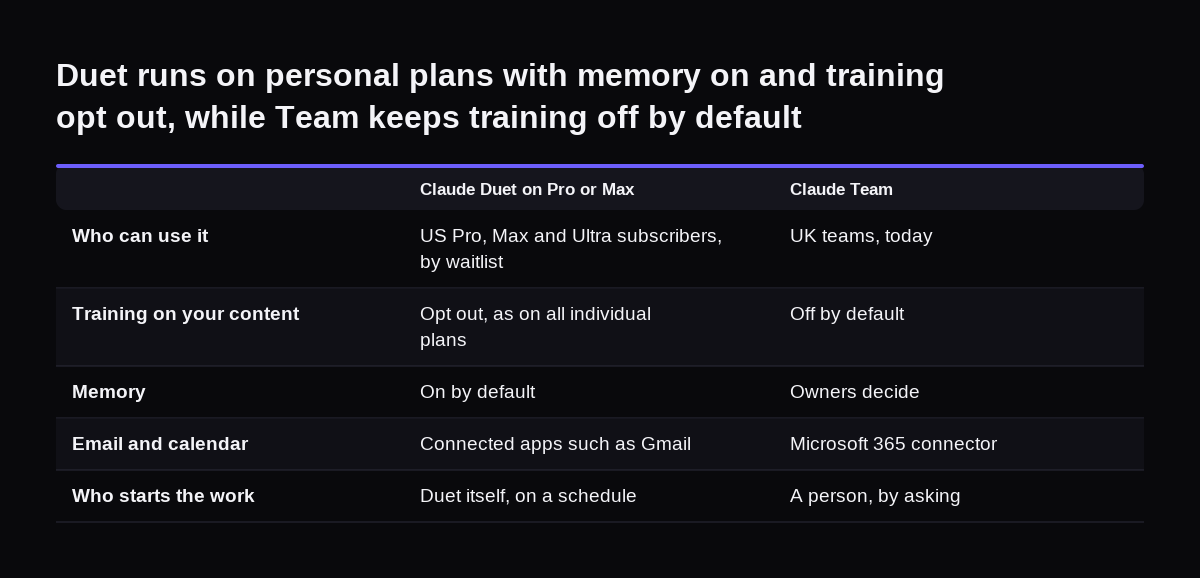
Claude Duet runs only on individual plans for now, and that matters for UK data protection. Anthropic's pricing page states that Team and Enterprise plans have no model training on your content by default. Individual plans, which include Pro, Max and Ultra, are opt-out instead.

Memory adds a second difference. Anthropic's help centre says memory is on by default for Free, Pro, Max and Ultra plans. On Team and Enterprise plans, owners control whether memory is available at all. On a personal plan, no company owner can switch it off.

The open questions on Duet's data retention make this sharper. If a UK employee connected a work inbox to a personal Pro account, customer data would sit in an account the company does not control. Under UK GDPR, that is hard to justify. Data minimisation, which limits personal information to what is necessary for a stated purpose, points the other way. The annotated UK GDPR articles for AI explain the obligations in more detail.

A sensible position for now has three parts:

  • Keep business data on Team or Enterprise seats, where training is off by default.
  • State in your AI policy that staff do not connect work accounts to personal Claude plans.
  • Review Duet again when Anthropic publishes its own help centre pages and brings it to Team plans.

If anyone in your organisation does buy a personal plan to test Claude, the pricing page notes that customers in the UK and EEA can request a refund in the app within a 14-day withdrawal period.

Duet runs on personal plans with memory on and training opt out, while Team keeps training off by default. Claude Duet on Pro or Max / Claude Team. Who can use it: US Pro, Max and Ultra subscribers, by waitlist / UK teams, today; Training on your content: Opt o

Preparing your Claude setup now so Duet is easier to adopt later

Work on skills and connectors done now is reported to carry straight into Claude Duet later. Guides report that Duet takes over memory, skills and connected apps from the Claude account. If Anthropic brings Duet to Team plans as reported, a team with good skills already in place starts ahead.

Skills are also portable beyond Claude. Anthropic announced on 22 October 2026 that it is donating Agent Skills, the open standard behind skills, to the Agentic AI Foundation. According to the Anthropic newsroom, more than 70 agent platforms have integrated Agent Skills since the standard was published in December 2025.

Connecting the systems your brief needs

A brief built only on email misses much of the business. Customer records in Zoho CRM or open tickets in Zoho Desk often matter more. For each connection, Svennis builds a connector, an MCP server, a plugin or a skill. We show the options with their cost, and the client chooses.

Running your own agent

Some firms will want proactive behaviour before Duet reaches Team plans. Anthropic's pricing page lists monthly API credits on the Max, Ultra and Team plans, which the release notes describe as credits for running your own apps and agents on the Claude Platform. The guide to building an AI agent with the Claude Agent SDK shows what that involves. Copy Duet's approval rules when you design it: a person approves anything sent, paid, signed or deleted.

Next steps for your business while Claude Duet stays in preview

Your first step is to decide which morning information your team actually needs. Claude Duet will not reach Team plans on a known date, so build the useful part now. Then work through these steps in order:

  1. List the three or four sources a useful daily brief would read, such as email, calendar and your CRM.
  2. Connect the first source on your Team plan, read-only, and write a short skill for the brief.
  3. Run the brief daily for a few weeks and refine the skill where it misses or misranks items.
  4. Add write tools only for drafts, with a person approving anything that leaves the business.
  5. Update your AI policy so work accounts stay off personal Claude plans.
  6. Check Anthropic's release notes for an official Duet announcement covering Team plans and data retention.

If you would rather have help, Svennis works in four steps. A Workshop maps the process. Then comes a pilot: Pilot Claude A puts an AI agent on Claude to work on one process, and Pilot Claude B sets up Claude Team for the whole team. A department Activation and monthly operations follow.

The page on Claude Pilot A, an AI agent live in 30 days, is the closest match to a working morning brief. It is a reasonable place to start if one process stands out.

Sources

  1. Plans & pricing, Claude by Anthropic
  2. Release notes, Claude Help Center
  3. Newsroom, Anthropic
  4. Claude Duet: Anthropic's Proactive AI Agent, ClaudeCowork
  5. Claude Duet Waitlist (Oct 2026), Munder Difflin
  6. Claude Duet: Anthropic's Proactive AI Agent, Explained, MeanCEO
  7. What is Claude Duet? George Moreas
  8. How to Use Claude Duet, AI Agents Library
  9. What Is Claude Duet and How Can It Help Your Business? Nexscope
  10. Claude Duet, Claude by Anthropic
  11. Claude Duet announcement, Claude by Anthropic
  12. Use Claude's chat search and memory, Claude Help Center
Free, 30 minutes

Pick a time. Bring the process this article made you think of.

You leave with a clear yes or no on putting Claude on it, and the step that fits from our published prices. You speak to someone who builds the agents, not a salesperson.

Prefer to call? +44 7588 772736 · Not ready to talk? See it on your business first.

30 minutes · video call · free
  1. 1Time
  2. 2Details
  3. 3Booked