
Svennis AI
10 min read

Claude inside a Zoho Creator app: how to set it up properly

Claude can sort records, draft replies and pull data out of free text inside a Zoho Creator app. This guide covers the routes, the models, the costs and the failure handling.

Abstract cover with interlocking blocks and a flowing line passing between them in a steady loop

Claude inside a Zoho Creator app: the short answer

Claude inside a Zoho Creator app works best as a helper. It reads a record and writes a suggestion back, and a member of staff accepts or corrects it. You connect it through a Deluge function or Zoho Flow that calls Claude. You pick a small model for routine sorting. You also design every step so the app still works when Claude does not answer.

Claude inside a Zoho Creator app is a setup in which your custom app sends text from a form to Claude and stores the reply in its own fields. Claude is the family of large language models built by Anthropic. A Deluge function is a short script that runs inside your Zoho app. Zoho Flow is Zoho's tool for building workflows between apps without code.

This guide covers three things. It shows the jobs where Claude earns its place in a Creator app. It compares the ways to connect the two, with a worked example. It then covers the parts that decide whether the app stays reliable: API keys, prompts, model choice and failure handling.
Three jobs where Claude earns its place in a Creator app

Claude earns its place in a Creator app when staff spend time reading free text and turning it into something structured. Three jobs fit that description well. Anthropic's own models page names the first two when it describes its smallest current model, Claude Haiku 5.5, as built "for high-volume, latency-sensitive tasks such as classification, extraction, and routing".

  • Classifying records. Claude reads a request, a complaint or an order note and picks one label from a list you supply, such as a category, a priority or a team.
  • Extracting data from free text. Claude pulls an order number, a date or a product name out of a paragraph and writes each one to its own field.
  • Drafting replies. Claude writes a first draft of a response that a member of staff edits and sends.

All current Claude models accept text and image input and support several languages. A Creator app can therefore pass a photo of a delivery note or a message written in Italian, as well as plain English text. The common thread is that Claude suggests and a person decides. Claude should not be the only check on a record that changes money, stock or a customer's account.

Five ways to connect Claude and Zoho Creator, compared

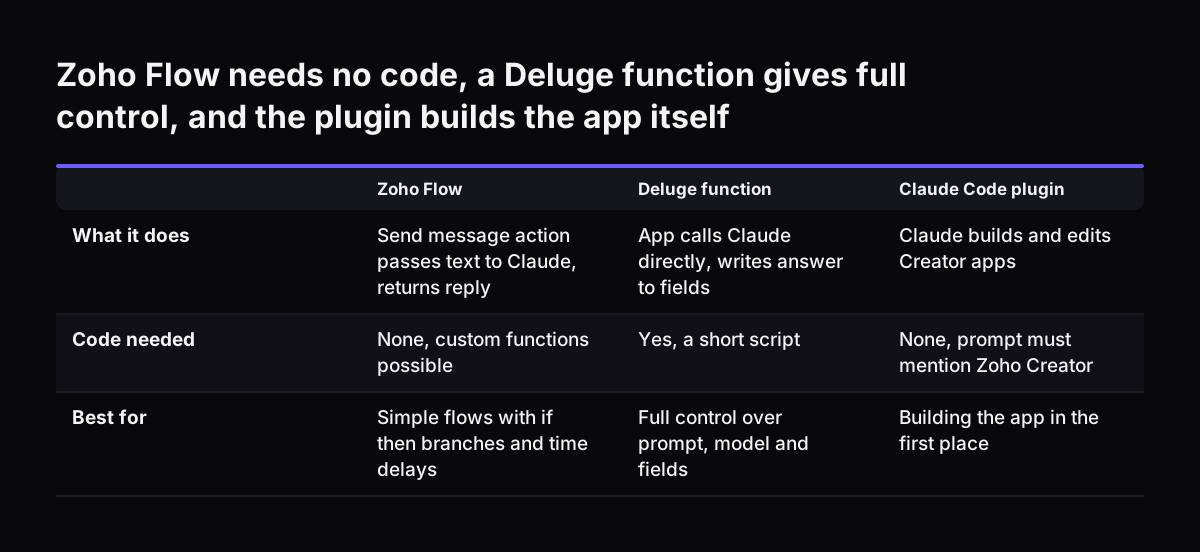
There are five routes between Claude and Zoho Creator, and they solve different problems. Two of them run Claude inside the app's own processes. Two of them let Claude reach your Creator data from outside the app. The fifth helps you build the app in the first place. The table sets them side by side.

RouteWhat it doesCode neededBest for
Zoho Flow, Anthropic Claude integrationThe "Send message" action sends text to Claude and returns the next replyNone, though custom functions are possibleSimple flows with if-then branches and time delays
Deluge function calling ClaudeYour app calls Claude directly and writes the answer to fieldsYes, a short scriptFull control over prompt, model and error handling
Zoho MCPExposes Zoho tools, actions and data to AI agentsMinimal, set up through a UIAgents and chat that act on Zoho data
CData Connect AIA remote MCP server that lets Claude query Creator dataNoneStaff asking questions of Creator data from Claude
Zoho Creator for Claude CodeA plugin that builds and edits Creator appsClaude Code writes itBuilding the app, not running it

MCP, the Model Context Protocol, is the open standard that lets AI agents talk to business software. Zoho describes its own Zoho MCP product as "the execution layer that enables AI agents to take real action", not an automation tool. Anthropic's MCP connector API lets developers connect to remote MCP servers like CData's. For a form that fills itself in, the first two routes are the ones to compare.

Zoho Flow needs no code, a Deluge function gives full control, and the plugin builds the app itself. Zoho Flow / Deluge function / Claude Code plugin. What it does: Send message action passes text to Claude, returns reply / App calls Claude directly,

Worked example: a service request form that Claude sorts and drafts

A service request app is a good first project for Claude inside a Zoho Creator app. The form has a free-text Description field. It also has three fields that Claude fills: Category, Order Number and Suggested Reply. A fourth field, Claude Status, records what happened. The field names here are illustrative; use your own.

The steps run like this:

  1. A customer or a colleague submits the form with a description in their own words.
  2. The app sends the description to Claude. In Zoho Flow, a webhook trigger can receive the record as JSON, form data or plain text, and the Anthropic Claude "Send message" action passes it on. A Deluge function can make the same call directly.
  3. The prompt tells Claude Haiku 5.5 to pick one category from a fixed list (Billing, Delivery, Technical, Other), to extract any order number, and to draft a two-paragraph reply.
  4. The answer goes into the suggestion fields, and Claude Status becomes "Suggested".
  5. An if-then branch checks that the category is on the list. Anything else sets Claude Status to "Needs review".
  6. A member of staff reads the suggestion, corrects it if needed, and sends the reply.

The record is saved at step 1, before Claude is involved. If Claude is slow or unavailable, the request still exists and a person can handle it. The same pattern works for order notes, supplier emails or job sheets.

Choosing the Claude model for each step, and what it costs

The Claude model you choose sets both the quality and the running cost of each call your Creator app makes. Anthropic prices its models per million tokens, with a token being a small piece of text. Input tokens are what you send and output tokens are what Claude writes back. Prices below come from Anthropic's models overview.

ModelPrice per million tokens (input / output)Positioned forNot retired before
Claude Haiku 5.5from $0.10 / from $0.50Classification, extraction and routing at high volume7 October 2027
Claude Sonnet 5.5$2 / $1030% faster than its predecessor, up to 30% cheaper for most work28 September 2027
Claude Opus 5.5$4 / $20Anthropic's suggested starting point when you are unsure22 September 2027
Claude Fable 5.1$10 / $50Demanding reasoning and long-horizon agentic work1 September 2027

For the service request example, Haiku 5.5 fits the sorting and extraction steps. A draft reply that needs judgement or careful tone may justify Sonnet 5.5 or Opus 5.5. All four share a context window of 1M tokens, a maximum output of 128K tokens and a reliable knowledge cutoff of June 2026. Our guide on when to use Claude Opus 5.5 covers the larger models in more depth.

API keys and access: who can call Claude from your Creator app

An API key is the secret that lets your Creator app call Claude, and whoever holds it can spend your budget. Keep it in one place that only administrators can open. Never store it in a form field, a report or a script that ordinary users can view. One key per app also helps, because you can then switch off a single app without stopping the others.

The Claude Console, Anthropic's developer account, is where keys are created and managed. Anthropic offers single sign-on for Console organisations, and only a Console Admin can configure it. Single sign-on lets staff log in with their company account, so leavers lose access when you close that account.

Access to data matters as much as access to Claude. Zoho states that agents using Zoho MCP "operate under user-level permissions", with OAuth for identity. An agent can therefore do only what that user may do. Apply the same rule to a Deluge or Flow route: send Claude only the fields it needs for the task. Our post on Zoho permissions for what Claude sees sets out how to decide that before go-live.

Prompts that give the same answer every time

A prompt is the instruction your Creator app sends to Claude with each record. For form automation, a good prompt behaves like a strict specification, not a conversation. It names the task, lists the allowed labels, and states the exact shape of the answer. Claude then returns something your app can check field by field.

Four habits keep prompts consistent:

  • Give a closed list of categories and tell Claude to use "Other" when nothing fits.
  • Ask for each value on its own labelled line, so the app can split the answer into fields.
  • Tell Claude to leave a field empty rather than guess when the text does not contain the value.
  • Keep the prompt in one place in the app, so a change applies everywhere at once.

Version control matters once you move to Anthropic's Agent Skills. Agent Skills are organised folders of instructions, scripts and resources that extend Claude. Anthropic's Skills guide warns that if a request omits the version or uses "latest", a version uploaded by anyone in the workspace "immediately changes what your production agents run". Pin the version in a live app and change it on purpose.

Handling failures so the Creator app keeps working

A Creator app that uses Claude must treat every call as something that can fail. The network can drop, a request can time out, or an answer can come back in the wrong shape. Anthropic also notes that your organisation's settings can make a request fail. For example, an administrator can disable web search even when the model supports it.

At Svennis we write Claude's answer into separate suggestion fields and keep the record saved even when the call fails. The failure we see most often at clients is a form that waits on Claude before it saves, so one slow reply stops the whole team.

Three further checks keep the app dependable:

  • Validate the answer. Reject any category that is not on your list and mark the record for manual review.
  • Check the model before you switch. The Models API returns max_input_tokens, max_tokens and a capabilities object for every available model.
  • Plan for retirement. Each model has an earliest retirement date, so note it and test the replacement before that date.

Test changes away from live data. Zoho recommends enabling Environments in Creator to test an app thoroughly before pushing changes to production.

Building the Creator app itself with Zoho Creator for Claude Code

Zoho Creator for Claude Code is a plugin that lets Claude build and edit Creator apps, which is separate from running Claude inside them. According to Zoho's help page for the plugin, it is in beta and works on all paid Creator plans. Only Super Admins can install and use it.

The setup has some limits worth knowing:

  • It runs in the Claude Code desktop app. The web version is not supported.
  • You get the plugin .zip file from Zoho Creator support and upload it through Settings, then Plugins.
  • Your prompt must mention Zoho Creator, so that Claude Code knows to use the plugin.
  • Tokens come from your Claude Code account, according to your active plan.

The plugin works in steps. Claude writes an implementation plan to a README.md file in your working directory. It then generates the app's .ds files, compiles them and uploads them. If an upload fails, Claude diagnoses the error and retries.

The plugin's upload sends every change in the local app folder, which is another reason to test in Environments first. You can build a new app, import an existing one or work on a local copy.

What Claude inside a Zoho Creator app means for a UK or European company

A UK or European company using Claude inside a Zoho Creator app should plan for three practical points. The first is language. All current Claude models support multiple languages. A form filled in German, Romanian or Italian can be sorted against one shared category list, and the draft reply can be written in the customer's language. Our post on multilingual customer replies with Claude in Zoho Desk shows the same idea in a helpdesk.

The second point is currency. Anthropic lists API prices in US dollars per million tokens. Your monthly cost in pounds or euros will move with the exchange rate, so set the budget with some headroom.

The third point is data handling. Decide which fields leave Zoho at all, and send only those. Check retention terms if you adopt Agent Skills. Anthropic states that Skills are not covered by zero data retention arrangements, and that Skill definitions and execution data follow its standard retention policy.

Anthropic processes the data on your behalf, so check that your Anthropic terms include data processing terms. Check too that the transfer of data out of the UK or EEA is covered. For a UK company, that can be the UK Extension to the EU-US Data Privacy Framework, if the recipient is certified for it. Otherwise it can be the International Data Transfer Agreement (IDTA) or the UK Addendum to the EU standard contractual clauses, with a transfer risk assessment. For a company in the EEA, it is usually the EU standard contractual clauses, or the EU-US Data Privacy Framework if the recipient is certified.

Record these choices in your data protection documentation before the app goes live.

Next steps for adding Claude to your Creator app

Adding Claude to a Creator app goes best when you start with one form and one job. Pick the form where staff spend the most time reading free text. Then work through these steps:

  1. Write down the labels or fields you want Claude to fill, and who checks the result.
  2. Choose the route. Use Zoho Flow for a simple flow without code, or a Deluge function for full control.
  3. Start with Claude Haiku 5.5 for sorting and extraction, and test a larger model only where drafts fall short.
  4. Store the API key where only administrators can see it, and send Claude only the fields it needs.
  5. Add suggestion fields and a status field, so failures never block a saved record.
  6. Test in a separate environment with real examples before going live.

For the mechanics of the direct route, read our guide on calling Claude from Zoho Deluge functions. If your Creator app sits alongside Zoho CRM, our setup guide on connecting Claude to Zoho CRM with MCP covers the agent side.

Sources

  1. 1. Anthropic newsroom
  2. 2. Anthropic: Models overview
  3. 3. Zoho Creator Help: Zoho Creator for Claude Code
  4. 4. Anthropic: Using Agent Skills with the API
  5. 5. Anthropic: Remote MCP servers
  6. 6. Claude Help Center: Set up single sign-on (SSO)
  7. 7. Zoho MCP
  8. 8. Zoho Flow: Anthropic Claude integrations
  9. 9. CData: Use Claude to talk to your Zoho Creator data

Related articles