Skip to content
SVENNISAIWe speak Claude.
Blog · Claude Docs

Docs, Slides and Design inside a Claude chat: a guide for business teams

A practical guide to making documents, decks and branded designs in a Claude chat: settings to check, a worked example, export formats, sharing and Enterprise admin controls.

10 min read

Book a 30-minute call · with a Claude Certified Architect from our team.

Article · 10 min read
Abstract layered rectangles sliding out from a central panel, suggesting pages and slides forming beside a conversation

Docs, Slides and Design inside a Claude chat: what you can make today

Docs, Slides and Design inside a Claude chat means you ask for a document, a slide deck or a branded design in an ordinary conversation. Claude then builds it in a panel beside the chat. You can edit it there, present it and download it as PowerPoint or PDF. All three are in beta on paid plans.

Each of these outputs is an artifact. Anthropic's Help Center defines an artifact as anything Claude makes that you would put in front of someone. Examples are a design, a deck, a document, a dashboard or a small interactive tool. It opens beside your conversation, and you can edit it, revisit it and share it.

The change came with a larger merger. Anthropic's announcement says Claude Cowork and chat are merging into one Claude. Claude Docs and Claude Slides are new, and Claude Design now works inside conversations too. According to one publisher, Docs and Slides launched in beta on 16 September 2026, the same day as the merger.

This matters for an office team because much of Claude's work is already written output. Anthropic's Claude Academy cites its Economic Index from June 2026. That index found that about a third of conversations with Claude produce a written deliverable, such as a document or presentation. Until now, that work ended with copying text into another program. Now the file itself comes out of the chat.
Availability and beta status of each template, by plan

Docs, Slides and Design are all in beta on paid plans, and Enterprise admins choose when to turn them on. The merged chat reached Pro, Max and Ultra first. Anthropic says Team and Free plans will follow soon, so a Team workspace may not see the new layout yet.

The Help Center lists the related templates and their status as follows:

TemplateStatusPlans
DocsBetaPaid plans; on Enterprise, on by default from 15 October 2026
SlidesBetaPaid plans; on Enterprise, on by default from 15 October 2026
DesignBetaPaid plans; on Enterprise, on by default from 15 October 2026
DashboardsBetaPro, Max, Ultra, Team and Enterprise
MotionBetaTeam and Enterprise; results export as MP4 video

Artifacts in general are available on Free, Pro, Max, Ultra, Team and Enterprise. Older artifacts behave differently. Legacy artifacts, made in a chat before 16 September 2026, keep working and can still be shared, but you cannot make new ones. Artifacts made in Cowork before 19 August 2026 keep working but cannot be edited in place.

If you are still weighing which plan your team needs, our guide to what Claude costs for a business and how to start sets out the options.

Settings to check before your team makes its first deck

Artifacts only work when file creation is switched on. The Help Center says artifacts require Cloud code execution and file creation to be on in Settings > Capabilities. In the updated Settings layout, that switch is called Create and edit files.

Check these four points before a team session:

  • Capabilities: Create and edit files is on for every person who will make a deck or document.
  • Google Drive: connected, if you want to send decks to Google Slides as editable copies.
  • Sharing policy: on Team and Enterprise, an owner of your organisation decides whether people can share outside it.
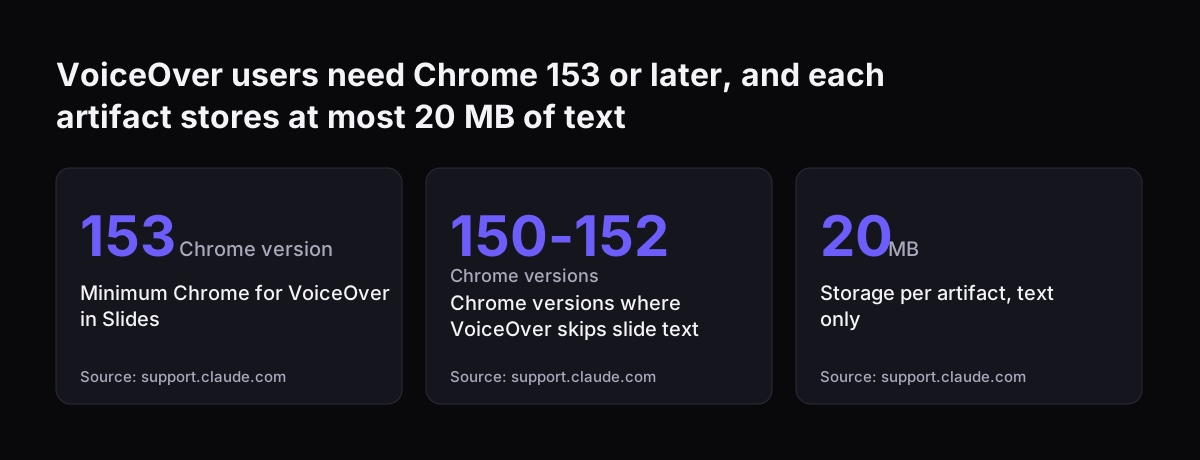
  • Browser: colleagues who use VoiceOver run Chrome 153 or later, because in Chrome 150 to 152 and in Claude Desktop, VoiceOver does not read text in a slide text box.

Two further limits are worth knowing up front. Each artifact has a 20 MB storage limit, and that storage accepts text only, with no images, files or binary data. Claude also decides what becomes an artifact: content that is significant and self-contained, typically over 15 lines.

By default, Claude asks before it takes an action. Anthropic's announcement says you can turn on a mode where it keeps working and checks in only when something needs a closer look. For a first week, leave the default in place.

VoiceOver users need Chrome 153 or later, and each artifact stores at most 20 MB of text: Minimum Chrome for VoiceOver in Slides 153 Chrome version, Chrome versions where VoiceOver skips slide text 150-152 Chrome versions, Storage per artifact, text
Source: support.claude.com

Worked example: a quarterly review deck made in one Claude chat

A quarterly review deck is a good first test, because the content already exists in notes and figures. Here is the sequence an office manager would follow, using the names Claude Academy gives.

  1. Open a new conversation on the web, in the desktop app or in the mobile app. Decks can also be requested in Claude Code.
  2. Attach your notes and the quarter's figures, then ask plainly: "Make a ten-slide quarterly review deck for the management team from these notes. Lead with the three results that changed most."
  3. Read the reply. If a fact or figure is not in your material, Claude is designed to ask for it, or to leave a visible placeholder on the slide and mention it in its reply. Search the deck for those placeholders before anyone else sees it.
  4. Edit the deck in the panel beside the conversation. Changes save as you make them, so there is no Save button.
  5. Mark any slide you want to keep but not show as Skip slide. It is left out when presenting or downloading, without being deleted.
  6. Rehearse with Present with speaker notes, which opens a second window with your notes, a clock, and the current and next slides.
  7. Download as PowerPoint, current fonts for colleagues who will edit it, or as PDF for those who will only read it.

Plan for one gap. Claude Academy notes that Claude may not be able to find or create photos for you, so keep your own product and team photos ready.

Editing, comments and charts in Claude Slides

Claude Slides gives you two ways to change a deck: edit it directly, or ask Claude in the conversation. Most teams use both. Small wording fixes are quicker by hand; restructuring a section is quicker as a request.

Comments are the third route. A colleague can leave a comment on a slide and send it to Claude to act on. Claude Academy states that you need edit access to the deck to send a comment to Claude. If a reviewer only has view access, their comments will not reach Claude, so give reviewers edit access or have them reply in your own conversation.

Charts need the most care. A chart in Claude Slides shows the data from when Claude built it. If the numbers change, you ask Claude to update it. The chart does not refresh on its own.

That matters for any deck you reuse. A monthly sales deck built in September still shows September's figures in November unless someone asks for an update. Put a line in your team's checklist: before presenting, ask Claude to update every chart from the latest figures, then check one value by hand.

A written document in Claude Docs, and the formats it exports to

Claude Docs produces documents you write with Claude and your team, rather than text you copy out of a chat. You ask for a proposal, a policy draft or a meeting brief, and the document opens beside the conversation, just as a deck does.

The Help Center lists where a finished document can go: Docs export to Word, PDF, Markdown and Google Docs. Word suits colleagues who mark up drafts with tracked changes. PDF suits a client or a board pack. Markdown suits anyone who publishes to an internal wiki.

You do not always have to choose the format yourself. According to one publisher's walkthrough, the new Output menu labels the Artifact option "Let Claude pick the format". That is useful when you are not sure whether the answer should be a document, a deck or a dashboard.

A practical pairing for an office team is a short brief in Docs and a deck in Slides, both from the same conversation. Write the brief first, agree the content, then ask Claude to turn the agreed brief into slides. The deck then rests on text your manager has already approved, which cuts the rounds of review.

On-brand output with Claude Design and a design system

Claude Design now works inside conversations, so a branded one-pager, poster or deck no longer needs a separate tool. Brand consistency depends on the design system, the set of colours, fonts and layouts Claude applies to what it makes.

Check where your design system lives first. Claude Academy states that a design system in standalone Claude Design, at claude.ai/design, has to be migrated before you can use it in Claude. Standalone Claude Design keeps working as before, so nothing breaks, but your chats will not see the design system until it is migrated.

Brand rules also cover words, not just looks: how you name products, which claims legal has cleared, how you write dates. A skill, which Anthropic describes as a way to teach Claude repeatable workflows tailored to how you work, is the natural place for those rules.

At Svennis, we set up the design system and a shared brand skill before a team makes its first deck, then open the first PowerPoint exports with the person who will present them. That check shows early which slides lose their look on export, before a client sees one.

Exporting to PowerPoint, PDF or Google Slides: which format to pick

The right export depends on what happens to the deck next. Claude Academy lists five download options, and a sixth route sends the deck to Google Slides when Google Drive is connected. The PowerPoint exports have one known trade-off: charts, icons and shapes become pictures, and slide transitions and skipped slides are left out.

FormatWhat you getUse it when
PDFA fixed file of the slidesThe deck goes to readers, not editors
Web page (.html)Plays in a browser like Present does, with transitions keptYou present from a browser on another machine
Current slide (.png)One slide as an imageYou need a single slide in an email or report
PowerPoint, current fontsAn editable deck in the deck's own fontsColleagues edit in PowerPoint and have the fonts
PowerPoint, basic fontsAn editable deck with fonts every computer hasThe deck goes outside your organisation
Google SlidesAn editable copy in Google SlidesYour team works in Google Workspace

Because charts become pictures in PowerPoint, decide where final chart edits happen. If someone will change a chart after export, ask Claude to make that change before you download, not after.

Sharing decks and documents with colleagues

Anything you make with Claude Design, Slides or Docs lives at one shareable link, which you can also open on your phone. Sharing a link is usually better than emailing an exported file, because everyone sees the current version.

Three rules govern who can open it. People you invite need a Claude account. On Team and Enterprise plans, an owner of your organisation decides whether you can share outside it. And as covered above, reviewers need edit access to send comments to Claude.

Usage also follows the person, not the creator. The Help Center says that for artifacts which call Claude, usage counts against each person's own plan limits rather than yours. A colleague working heavily with a shared tool does not drain your allowance.

Artifacts can also read from and write to tools connected to Claude, such as Asana, Google Calendar and Slack. One limit applies: connector tools that need approval for each action are not available to artifacts. If your team relies on an approval step, that step stays in the conversation, which is usually where you want it.

What an Enterprise admin switches on, and when

On Claude Enterprise, the admin controls the timing. Anthropic's announcement says Enterprise admins choose when to turn Docs, Slides and Design on. The Help Center adds a fixed date: on Enterprise plans the templates turn on by default on 15 October 2026, and owners can turn them on before then.

The unified chat followed shortly after. An update on Anthropic's announcement says the unified experience became generally available for Claude Enterprise on 23 October. Anthropic has also committed to telling Enterprise admins at least 30 days before anything changes for their organisations.

An admin's checklist, drawn from those pages and the release notes:

  • Decide whether to enable the templates before the default date, or let them switch on.
  • Confirm Create and edit files is on in Settings > Capabilities.
  • Set the policy on sharing outside the organisation.
  • Use groups to stage the rollout. Since April 2026, admins can organise users into groups, manually or via SCIM from the identity provider, and give each group a custom role defining which Claude capabilities its members can use.

Groups make a pilot simple: switch the templates on for one department, review a month of output, then widen access.

What this means for a UK company on Microsoft 365 or Google Workspace

For a UK company, the export route decides how well Docs, Slides and Design fit existing habits. If your office runs on Microsoft 365, the PowerPoint and Word exports are the ones that matter. The basic-fonts option protects decks you send to clients.

The Microsoft 365 connector extends that. The release notes for July 2026 say Claude can create and update files in OneDrive and SharePoint once write tools are enabled. It can also draft and send email. Our post on connecting Claude in Microsoft 365 and Teams to the systems behind it covers that setup.

If you run on Google Workspace, the route is Google Slides and Google Docs. With Google Drive connected, you can send a deck to Google Slides as an editable copy. Claude Docs exports to Google Docs in the same way. Your team then edits the copy in the tool it already uses.

Your figures often live in a business system, such as Zoho CRM. For each such connection we build a connector, an MCP server, a plugin or a skill. We show you the options with their cost, and you choose.

Next steps for your team

Start with one real deliverable, not a demonstration. Pick a deck or document your team produces every month, and make the next one in a Claude chat using the worked example above.

  1. Check that Create and edit files is on for the people involved.
  2. Migrate your design system from standalone Claude Design, if you have one.
  3. Write your brand rules into a shared skill.
  4. Make the deck, search it for placeholders, and update every chart before presenting.
  5. Export to the format your readers need, using the table above.
  6. If you run Enterprise, decide whether to switch the templates on before 15 October 2026 or let the default apply.

If your team already works in Cowork, our explainer on Claude Cowork for UK firms shows how that work carries over: Anthropic says your chats, projects, artifacts, connectors and skills stay where you left them.

If you want help setting this up for a whole team, Svennis works in four steps: the Workshop, a pilot, the department Activation, then monthly operations. For a team-wide rollout, the pilot is Pilot Claude B, Claude Team set up for your whole team.

Sources

  1. Claude Academy: Making slides and presentations with Claude
  2. Claude Help Center: What are artifacts and how do I use them?
  3. Claude Help Center: Release notes
  4. Anthropic: Claude Cowork and chat are now one Claude
  5. Mo Explains: Claude Docs and Claude Slides, Word and PowerPoint export explained
Free, 30 minutes

Pick a time. Bring the process this article made you think of.

You leave with a clear yes or no on putting Claude on it, and the step that fits from our published prices. You speak to someone who builds the agents, not a salesperson.

Prefer to call? +44 7588 772736 · Not ready to talk? See it on your business first.

30 minutes · video call · free
  1. 1Time
  2. 2Details
  3. 3Booked